
This Business Impact Analysis Template With RTO/RPO Calculator gives business continuity teams a free Excel download to quantify downtime impact in minutes. At 2:42 AM on February 22, 2024, an AT&T equipment configuration change triggered a 12-hour nationwide wireless outage that affected 125 million devices and blocked 25,000 calls to 911 — documented in the FCC investigation report.
No single customer had planned for AT&T to be unavailable. That is the gap a business impact analysis template is built to close — the gap between “we depend on them” and “we have scored what happens when they stop.” A structured Business Impact Analysis Template With RTO/RPO calculator turns that guesswork into measurable recovery objectives.
The 2024 Change Healthcare ransomware attack and the July 2024 CrowdStrike Falcon outage delivered the other two members of the trio. Change Healthcare froze US medical claims for weeks; CrowdStrike caused an estimated $5.4 billion in Fortune 500 losses and $1.9 billion in healthcare losses. Every affected firm had a BCP. Using a Business Impact Analysis Template With RTO/RPO fields built in, teams can benchmark recovery time and recovery point objectives against real incident data.
Few had a business impact analysis template that had actually scored these dependencies.
This 2026 guide walks through what a modern business impact analysis template captures, how RTO/RPO/MTPD are scored, how to run a 60-day BIA workshop, and how the output feeds ISO 22301 Clause 8, NIST CSF 2.0 Recover, FFIEC examinations, and HIPAA contingency planning. A practical Business Impact Analysis Template With RTO/RPO Calculator bridges that gap between policy and execution.
Why a Business Impact Analysis Template With RTO/RPO Matters More in 2026
The 2019 playbook treated a business impact analysis template as a once-every-three-years compliance task.
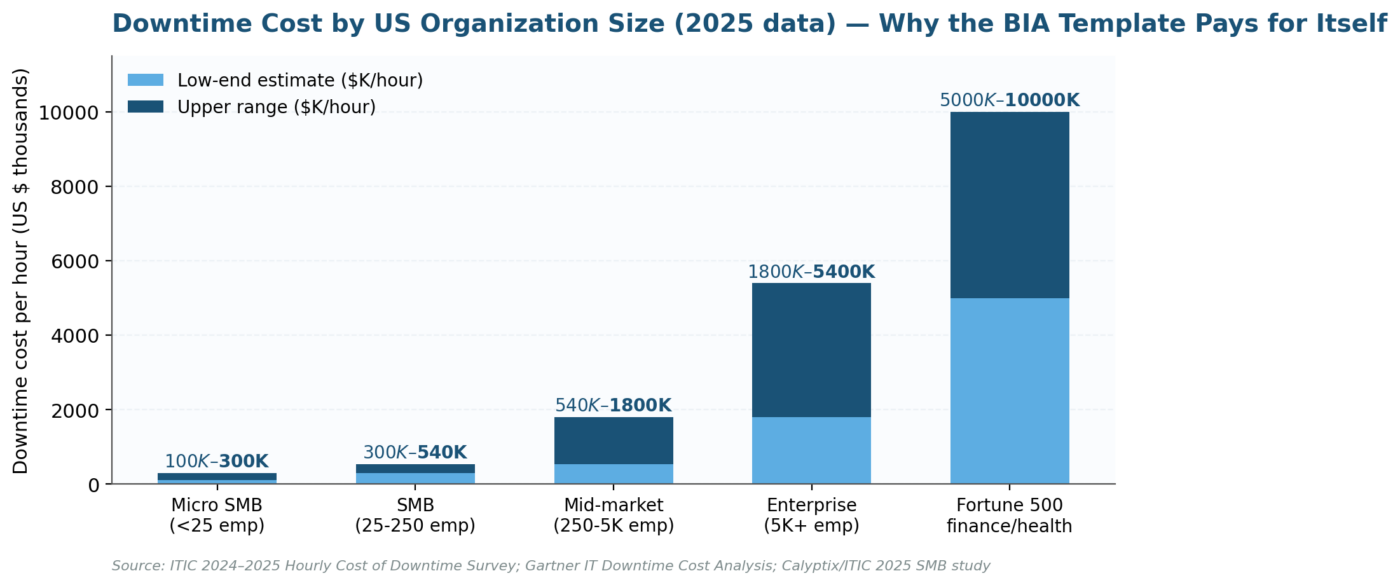
The 2024 incident record killed that playbook. ITIC’s 2024 Hourly Cost of Downtime Survey found that 91% of US enterprises lose more than $300,000 per hour of unplanned downtime, with finance and healthcare firms routinely exceeding $5 million per hour. Without a Business Impact Analysis Template With RTO/RPO Calculator, those downtime costs remain invisible until an incident makes them undeniable.
A template that scores these dependencies pays for itself the first time it prevents an overnight escalation.
US regulators have followed the loss curve. The FFIEC IT Handbook on Business Continuity Management and its Section III.A on Business Impact Analysis are now referenced in every operational-resilience examination at US banks. The Business Impact Analysis Template With RTO/RPO Calculator is the analytical tool behind those compliance expectations.
The FINRA 2026 Annual Regulatory Oversight Report added third-party cyber failures as a focus area. Both changes hit the BIA directly — the template must score vendor dependencies as first-class risks. Boards increasingly expect a Business Impact Analysis Template With RTO/RPO Calculator in the evidence package.
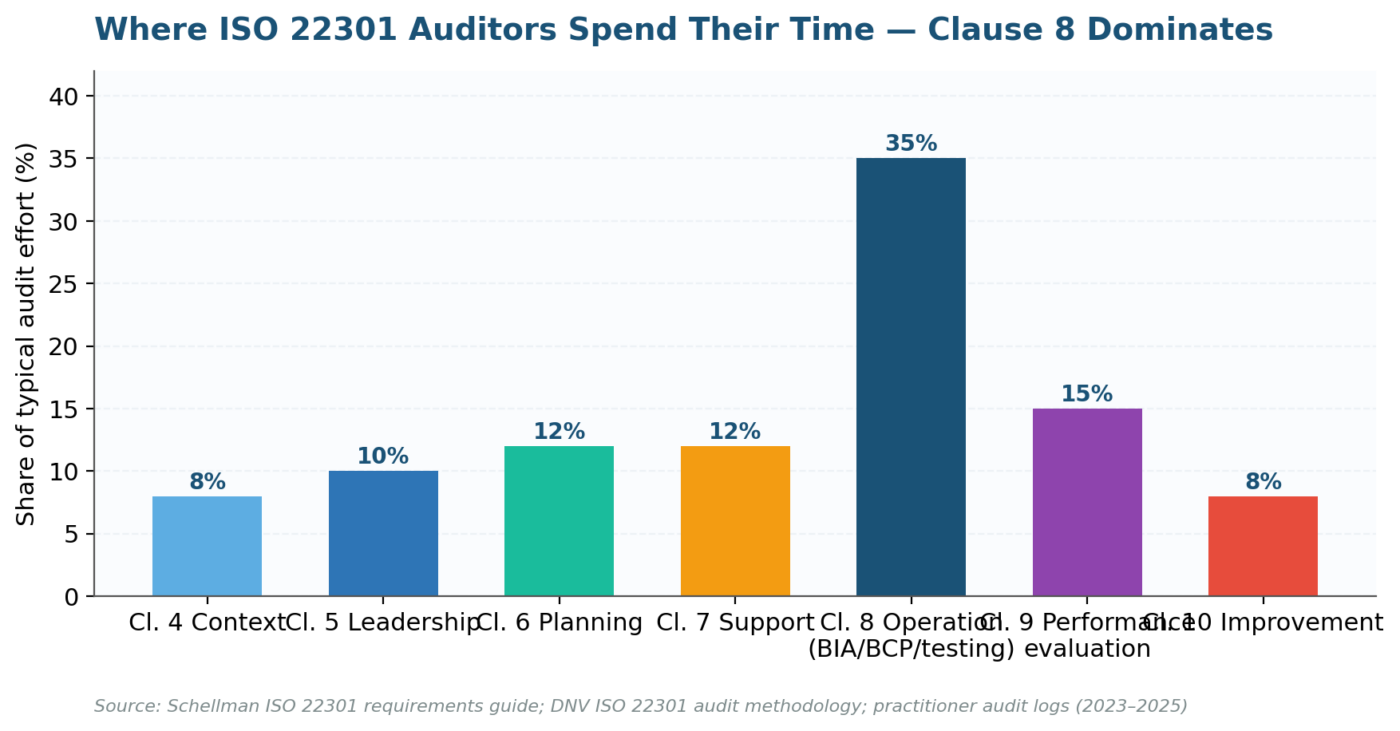
In February 2024, ISO published ISO 22301:2019/Amendment 1:2024, adding climate change as a required contextual consideration in Clauses 4.1 and 6.1.1. Auditors now probe climate exposure in every BCMS surveillance review. The Business Impact Analysis Template With RTO/RPO Calculator in this guide supports that amendment directly.
Any business impact analysis template built on a pre-2024 structure produces a major nonconformity at the next audit — a cheap problem to prevent and an expensive one to fix retroactively. Upgrading to a modern Business Impact Analysis Template With RTO/RPO Calculator is therefore non-negotiable.
The amended SEC Regulation S-P closes the regulatory frame with a 30-day customer-notification clock on cyber incidents. That clock translates directly into RTO scoring inside the business impact analysis template — if detection takes 28 days, the notice window is a legal fiction. Integrating detection-speed assumptions into the BIA template is the single highest-leverage update for 2026. A well-designed Business Impact Analysis Template With RTO/RPO Calculator helps evidence compliance with these overlapping regulatory frames.
Key Takeaways
| # | Takeaway |
| 1 | A Business Impact Analysis (BIA) is the structured process that identifies an organization’s critical activities, quantifies the impact of their disruption, and establishes recovery time objectives. The BIA drives every business continuity decision that follows. |
| 2 | The free Excel template includes five sheets: BIA Questionnaire (14 fields, 16 sample activities, automated BIA scoring), RTO/RPO Summary (auto-calculated recovery targets linked to criticality), Dependency Map, BIA Dashboard (formula-driven metrics), and Scoring Guide. |
| 3 | RTO (Recovery Time Objective) defines the maximum tolerable downtime before unacceptable consequences occur. RPO (Recovery Point Objective) defines the maximum tolerable data loss measured in time. MTPD (Maximum Tolerable Period of Disruption) sets the absolute ceiling before viability is threatened. |
| 4 | The template auto-calculates BIA scores using a weighted formula that combines financial impact, operational impact, regulatory impact, and reputational impact. Criticality ratings (Critical/High/Medium/Low) and RTO/RPO targets derive automatically from the BIA score. |
| 5 | ISO 22301:2019 (Business Continuity Management) requires a BIA as the foundation of the BCM program. Without a BIA, the organization cannot set recovery priorities, allocate resources, or write a credible Business Continuity Plan. |
| 6 | Dependencies are the hidden risk multiplier. The Dependency Map sheet captures system, people, vendor, data, and upstream/downstream dependencies that determine cascade failure paths. |
| 7 | Download the template, customize the scoring thresholds to your organization, run BIA workshops with each department, and use the outputs to build your BCP and disaster recovery plans. |
What Is a Business Impact Analysis?
A Business Impact Analysis is the systematic process of identifying the organization’s critical business activities, assessing the consequences of their disruption across financial, operational, regulatory, and reputational dimensions, and establishing the recovery time and data-loss objectives that the business continuity program must achieve. This is why every resilient organization needs a Business Impact Analysis Template With RTO/RPO Calculator as part of its BCMS toolkit.
ISO 22301:2019 (Business Continuity Management Systems) requires the BIA as a foundational element of the BCM program (Clause 8.2.2). A compliant Business Impact Analysis Template With RTO/RPO Calculator operationalizes this requirement.
The standard mandates that the organization must analyze the impact of disruption over time, identify the timeframes within which impacts become unacceptable, and set prioritized timeframes and resources required to resume activities to a minimum acceptable level. The Business Impact Analysis Template With RTO/RPO Calculator operationalizes this clause in a format auditors can trace.
The BIA answers three questions every CEO, CRO, and board member needs answered: (1) Which activities must recover first? (2) How fast must they recover? (3) How much data loss can the organization absorb? Without those answers, the business continuity plan is guesswork, the disaster recovery plan allocates resources blindly, and the organization discovers its true priorities only during a crisis. Answering them rigorously requires a Business Impact Analysis Template With RTO/RPO Calculator rather than spreadsheets built ad hoc.
What’s Inside the Free Excel BIA Template
A defensible business impact analysis template captures at least 14 fields per critical activity. Older templates that list “activity, owner, RTO, RPO” miss the audit evidence modern regulators expect. Each field feeds the Business Impact Analysis Template With RTO/RPO Calculator that produces the final criticality score.
The schema below meets ISO 22301:2019 Clause 8.2.2 requirements, reflects the 2024 climate amendment, and produces evidence that FFIEC, OCC, and FINRA examiners recognise during a risk-focused review. The Business Impact Analysis Template With RTO/RPO Calculator maps each of these fields to a defensible data point.
The downloadable template contains five interconnected sheets. Each sheet serves a distinct role in the BIA workflow, from data collection through recovery-target calculation to executive reporting. Together these sheets form the complete Business Impact Analysis Template With RTO/RPO Calculator workflow.
| Sheet | Purpose | Key Features |
| 1. BIA Questionnaire | Core data-collection instrument: captures every business activity, its impact dimensions, and assigns criticality | 14 standardized fields; 16 pre-populated sample activities; weighted BIA-score formula (financial + operational + regulatory + reputational); auto-generated criticality ratings with conditional formatting (red/amber/green); auto-calculated RTO and RPO targets |
| 2. RTO/RPO Summary | Consolidated view of recovery targets by activity, linked directly to the BIA Questionnaire | Auto-populated activity IDs and names; criticality ratings pulled via formulas; RTO, RPO, and MTPD auto-calculated; blank columns to document recovery strategy and alternate-site requirements |
| 3. Dependency Map | Documents system, people, vendor, data, and upstream/downstream dependencies per critical activity | Pre-populated with five sample activities showing dependency structure; blank rows to add the remaining activities; identifies single points of failure and cascade paths |
| 4. BIA Dashboard | Automated executive summary of the BIA results | Formula-driven counts: total activities, Critical/High/Medium/Low breakdown, total daily financial exposure, critical-activity financial exposure, average BIA score, shortest RTO and RPO; RTO/RPO default benchmarks by criticality level |
| 5. Scoring Guide | Reference sheet that defines what each impact score (1–5) means across operational, regulatory, and reputational dimensions | 5-level scoring definitions with concrete, measurable descriptors; ensures scoring consistency across departments and assessors |
RTO, RPO, and MTPD: The Three Recovery Metrics Every BCP Depends On
These three metrics are the outputs of the BIA that directly drive business continuity planning, disaster recovery architecture, and resource-allocation decisions. The Business Impact Analysis Template With RTO/RPO Calculator produces all three metrics from a single dataset.
| Metric | Full Name | Definition | What Drives the Number | Example |
| RTO | Recovery Time Objective | The maximum duration of time the organization can tolerate the activity being unavailable before the impact becomes unacceptable | Criticality rating from the BIA; financial loss per hour/day of downtime; regulatory deadlines; contractual SLA commitments | Customer Payment Processing: RTO = 4 hours (Critical). Beyond 4 hours, SLA penalties trigger and daily financial loss exceeds $150K. |
| RPO | Recovery Point Objective | The maximum amount of data loss, measured in time, that the organization can tolerate. Defines how frequently data must be backed up or replicated. | Transaction volume and velocity; regulatory record-keeping requirements; cost of data re-entry versus real-time replication; criticality of data integrity | Core Banking System: RPO = 1 hour. Losing more than 1 hour of transaction data requires manual reconciliation costing $50K+ and risks regulatory breach. |
| MTPD | Maximum Tolerable Period of Disruption | The absolute maximum time the activity can remain disrupted before the organization’s viability, regulatory standing, or stakeholder relationships are irreversibly threatened. MTPD is always longer than RTO. | Accumulated financial losses; regulatory enforcement timelines; contractual termination clauses; member/customer attrition thresholds | Claims Processing: MTPD = 24 hours. Beyond 24 hours, regulatory notification obligations trigger and member confidence collapses. |
Relationship: RPO ≤ RTO ≤ MTPD. The RPO tells IT how often to back up data. The RTO tells the BCP team how fast to restore the activity. The Business Impact Analysis Template With RTO/RPO Calculator enforces that relationship mathematically.
The MTPD tells the Board the outer boundary beyond which the organization faces existential consequences. All three flow directly from the BIA scoring. The Business Impact Analysis Template With RTO/RPO Calculator surfaces the MTPD alongside recovery targets for Board-level visibility.
The template auto-calculates default RTO and RPO targets based on the criticality rating: Critical = 4-hour RTO / 1-hour RPO, High = 8-hour RTO / 4-hour RPO, Medium = 24-hour RTO / 12-hour RPO, Low = 72-hour RTO / 24-hour RPO. MTPD defaults to 3× RTO. Customize these thresholds to your organization’s risk appetite. Those defaults are the core engine of the Business Impact Analysis Template With RTO/RPO Calculator.
The 14 Fields in the BIA Questionnaire: What Each Captures
| Field | Column | Purpose | Data Type |
| Activity ID | A | Unique identifier that tracks the activity across BIA, BCP, and DR documents | Text (BA-001, BA-002) |
| Business Activity / Process | B | Name of the activity or process being assessed | Text |
| Department / Business Unit | C | The organizational unit that performs the activity | Text |
| Activity Owner | D | Named individual accountable to deliver the activity and participate in recovery | Text (name or title) |
| Activity Description | E | Concise description of what the activity does, including key outputs and service levels | Text |
| Dependencies | F | Systems, people, vendors, and data the activity requires to operate. Critical input that determines cascade failure paths. | Text (list format) |
| Financial Impact per Day ($) | G | Estimated daily financial loss if the activity is completely disrupted. Includes revenue loss, penalty costs, overtime, and remediation. | Currency (blue input) |
| Operational Impact (1–5) | H | Severity of operational consequences using the Scoring Guide definitions | Number 1–5 (blue input) |
| Regulatory / Compliance Impact (1–5) | I | Severity of regulatory consequences: fines, enforcement actions, license risk | Number 1–5 (blue input) |
| Reputational Impact (1–5) | J | Severity of reputational consequences: media exposure, customer loss, stakeholder confidence | Number 1–5 (blue input) |
| Overall BIA Score | K | Auto-calculated weighted score combining all four impact dimensions. Formula: (Operational + Regulatory + Reputational) / 3 × 0.4 + MIN(Financial / $50K, 5) × 0.6 | Formula; color-scale gradient |
| Criticality Rating | L | Auto-generated: Critical (≥4), High (≥3), Medium (≥2), Low (<2) | Formula; conditional formatting |
| RTO (Hours) | M | Auto-calculated recovery time objective derived from criticality: Critical=4h, High=8h, Medium=24h, Low=72h | Formula (red bold) |
| RPO (Hours) | N | Auto-calculated recovery point objective derived from criticality: Critical=1h, High=4h, Medium=12h, Low=24h | Formula (red bold) |
Blue-font cells are inputs you type. Black-font cells are formulas that calculate automatically. Red-bold font in the RTO and RPO columns draws immediate attention to the recovery targets that the BCP and DR plans must achieve. This input/output logic is what makes the Business Impact Analysis Template With RTO/RPO Calculator auditable.
How to Run a BIA Workshop: Seven-Step Process
| Step | Action | Practical Guidance |
| 1. Define scope and prepare | Identify all business activities in scope; distribute the BIA Questionnaire template and Scoring Guide to department heads 5 business days before the workshop | Scope should cover every activity, not only those management considers “critical.” The BIA determines criticality; assumptions should not. |
| 2. Brief participants | Open the workshop with a 15-minute briefing: explain the BIA purpose, the scoring scales, the RTO/RPO concepts, and the dependency-mapping requirement | Use the Scoring Guide sheet as the reference document. Print copies. Define terms on first use. |
| 3. Assess each activity | Walk through each business activity row by row. The activity owner provides the description, dependencies, and impact estimates. The facilitator challenges and calibrates. | Score as a group, not individually. Group calibration reduces bias. Use real incident data where available. |
| 4. Score financial impact | Estimate the daily financial loss if the activity is completely unavailable. Include direct revenue loss, regulatory penalties, SLA penalties, overtime, and remediation costs. | Financial impact is the hardest number to get right. Use ranges ($100K–$250K) if point estimates are impossible. Document assumptions. |
| 5. Score operational, regulatory, and reputational impact | Apply the 1–5 scoring scales from the Scoring Guide sheet. Each assessor scores independently, then the group discusses and agrees on a consensus score. | Regulatory impact deserves special attention in regulated industries: pension funds, banking, healthcare. A regulatory breach can exceed the financial-loss estimate. |
| 6. Map dependencies | Complete the Dependency Map sheet by documenting every system, person, vendor, data source, and upstream/downstream activity the business activity relies on. | Dependencies reveal cascade paths: if Activity A depends on System X, and System X fails, Activity A fails. The dependency map identifies which systems and vendors require the fastest RTO. |
| 7. Validate and approve | Review the auto-calculated BIA scores, criticality ratings, and RTO/RPO targets. Adjust scoring where the auto-calculated targets do not reflect business reality. Present the BIA Dashboard to the CRO and executive committee. | The BIA is not a one-time exercise. Schedule annual reassessment and trigger ad-hoc reviews after organizational changes, acquisitions, or major incidents. |
Our guides on risk assessment process and enterprise risk management frameworks provide complementary methodology that integrates with the BIA workflow. They also complement the Business Impact Analysis Template With RTO/RPO Calculator by framing threat likelihood.
From BIA to BCP: How the Template Feeds the Business Continuity Plan
The BIA is not an end product. The BIA produces the inputs that the Business Continuity Plan and Disaster Recovery Plan consume. The workflow below shows exactly how BIA outputs map to BCP components. The Business Impact Analysis Template With RTO/RPO Calculator is where those inputs first become quantified.
| BIA Output | Feeds Into | BCP/DRP Component | Action Required |
| Criticality ratings | Recovery priority sequence | The BCP’s prioritized activity-recovery order: Critical activities first, then High, then Medium, then Low | Rank activities by criticality in the BCP recovery-sequence table. Assign Incident Response Team leads per critical activity. |
| RTO targets | Recovery timelines and SLA commitments | The BCP’s recovery-timeline table: each activity’s target recovery time, escalation point if RTO is at risk | Define recovery procedures that can achieve each RTO. If the 4-hour RTO on payments cannot be met, the BCP must document the gap and the resource investment required to close the gap. |
| RPO targets | Backup and replication architecture | The DRP’s backup-frequency and replication strategy: real-time replication, hourly snapshots, daily backups | Map each RPO to a technical backup solution. A 1-hour RPO requires near-real-time replication. A 24-hour RPO is served by nightly backups. |
| MTPD thresholds | Escalation triggers and crisis-management activation | The BCP’s escalation matrix: if RTO is breached and MTPD approaches, activate crisis management and external communication | Define MTPD breach as the trigger to move from BCP execution to crisis management. Board notification, regulatory notification, and media holding statements must be pre-drafted. |
| Dependency map | Single-point-of-failure analysis and vendor-recovery requirements | The BCP’s dependency-recovery annexes: system-recovery procedures, vendor-activation contacts, alternate-site requirements | Ensure every critical dependency has a recovery procedure. If the cloud provider is a single point of failure, the BCP must specify the failover architecture and activation steps. |
| Financial-impact data | Recovery-investment justification | The business case that justifies BCP/DRP budget: cost of disruption versus cost of resilience | Present the BIA Dashboard to the CFO: total daily financial exposure across critical activities versus the cost of achieving the RTO/RPO targets. The ROI writes itself. |
This is the BCM lifecycle in action: BIA → BCP → DRP → Exercise → Review. The BIA is Step 1. Skip the BIA and every subsequent step lacks a foundation. See our guide on operational resilience to understand how the BIA supports broader resilience mandates. The Business Impact Analysis Template With RTO/RPO Calculator is the first and most critical input in that cycle.
How the BIA Scoring Formula Works
The template uses a weighted scoring formula that combines qualitative impact scores with quantified financial-loss data. The Business Impact Analysis Template With RTO/RPO Calculator automates both dimensions.
The formula ensures that activities with high dollar-loss exposure receive appropriate criticality ratings even if the qualitative scores are moderate. The Business Impact Analysis Template With RTO/RPO Calculator enforces that weighting automatically.
The Formula
BIA Score = (Operational + Regulatory + Reputational) / 3 × 0.4 + MIN(Financial / $50,000, 5) × 0.6
| Component | Weight | What the Component Captures | Why This Weight |
| Qualitative Average: (Operational + Regulatory + Reputational) / 3 | 40% | The average severity across three non-financial impact dimensions, each scored 1–5 | Captures impacts that resist dollar quantification: operational cascade effects, regulatory enforcement risk, reputational damage |
| Financial Normalization: MIN(Financial per Day / $50,000, 5) | 60% | Converts the daily financial-loss estimate into a 1–5 scale by dividing by $50K and capping at 5 | Financial impact receives the higher weight because it directly translates to funded-status erosion, cash-flow stress, and stakeholder loss. The $50K divisor and 5-cap are configurable. |
Customize the weights and the financial divisor to your organization. A pension fund with a $10 billion asset base might set the divisor at $200K. The Business Impact Analysis Template With RTO/RPO Calculator is built to accept these customizations.
A mid-size services firm might use $25K. The divisor should reflect the threshold at which a daily loss transitions from “inconvenient” to “material.” Adjust the formula in Column K of the BIA Questionnaire sheet. Whatever divisor you choose, the Business Impact Analysis Template With RTO/RPO Calculator applies it consistently across every process.
Criticality thresholds derive from the BIA score: Critical ≥ 4, High ≥ 3, Medium ≥ 2, Low < 2. The RTO/RPO auto-calculation then maps criticality to recovery targets. The entire chain is formula-driven: change one input and the downstream targets recalculate instantly. The Business Impact Analysis Template With RTO/RPO Calculator automates that classification.
Eight Pitfalls That Undermine Business Impact Analyses
| # | Pitfall | Consequence | Fix |
| 1 | Skipping the BIA and writing the BCP directly | Recovery priorities are assumed, not evidence-based; the BCP protects the wrong activities first | Always run the BIA before drafting the BCP. The BIA produces the evidence; the BCP consumes the evidence. |
| 2 | Assessing departments instead of activities | Department-level BIAs miss the fact that a single department may contain both critical and non-critical activities | Assess at the activity level. “Finance” is not an activity. “Customer Payment Processing” is. |
| 3 | Using inconsistent scoring across departments | Department A scores a $100K daily loss as “High”; Department B scores the same loss as “Medium.” The results are incomparable. | Publish and enforce a single Scoring Guide across all departments. Use the template’s Scoring Guide sheet. |
| 4 | Ignoring dependencies | The BIA says the activity can recover in 4 hours, but the activity depends on a system with a 24-hour vendor-restore SLA | Map all dependencies. The activity’s effective RTO equals the slowest dependency’s recovery time. |
| 5 | Treating RTO as aspirational rather than achievable | The BIA sets a 4-hour RTO, but the DR architecture can only deliver a 12-hour restore | Validate every RTO against the actual technical recovery capability. If a gap exists, either invest to close the gap or adjust the RTO and document the accepted risk. |
| 6 | Confusing RPO with backup frequency | The RPO is 1 hour, but the backup runs nightly. The gap between the RPO and the backup frequency is unprotected data. | Map each RPO to the actual backup/replication schedule. RPO = 1 hour requires at least hourly backup or continuous replication. |
| 7 | Running the BIA as a one-time project | The BIA is completed, filed, and never updated. Within 12 months the organization has changed enough to invalidate the results. | Schedule annual BIA reassessment. Trigger ad-hoc updates after organizational changes, system migrations, regulatory changes, or major incidents. |
| 8 | No executive sign-off on recovery targets | RTO/RPO targets sit in a spreadsheet that nobody outside the BCM team has approved | Present the BIA Dashboard to the executive committee and Board Risk Committee. Recovery targets must be formally approved because they drive budget allocation and risk acceptance. |
From Template to Operational BIA Program
| Phase | Timeline | Actions | Owner | Deliverable |
| Phase 1: Customize and Prepare | Days 1–15 | Download the template; customize scoring thresholds, financial divisor, and RTO/RPO defaults to your organization; align the Scoring Guide with your risk appetite statement; identify all in-scope business activities across departments; schedule BIA workshops | Risk Manager / BCM Coordinator | Customized BIA template; complete activity inventory; workshop schedule |
| Phase 2: Conduct BIA Workshops | Days 16–45 | Run facilitated workshops with each department; populate the BIA Questionnaire activity by activity; complete the Dependency Map; calibrate scores across departments to ensure consistency | Risk Manager / Department Heads | Populated BIA Questionnaire; completed Dependency Map; calibrated scores |
| Phase 3: Validate and Approve | Days 46–65 | Review auto-calculated BIA scores, criticality ratings, and RTO/RPO targets; validate RTOs against actual technical recovery capability (IT/DR team); present the BIA Dashboard to the CRO and executive committee; obtain formal approval of recovery targets | CRO / CIO / Executive Committee | Approved BIA report; validated RTO/RPO targets; executive sign-off |
| Phase 4: Feed BCP and Embed | Days 66–90 | Use BIA outputs to draft or refresh the BCP recovery-priority sequence; update the DR plan to align backup/replication schedules with RPO targets; configure the BIA Dashboard as a standing board-reporting artifact; schedule annual BIA reassessment | BCM Coordinator / IT / Board Risk Committee | Updated BCP; aligned DRP; BIA Dashboard in board-reporting cycle; annual reassessment calendar |
BIA Regulatory Requirements: Who Mandates It?
Multiple standards and regulations require or strongly recommend BIA completion. The table below maps the mandate sources relevant to U.S. organizations. Each of those mandates becomes easier to satisfy with a Business Impact Analysis Template With RTO/RPO Calculator in place.
| Standard / Regulation | BIA Requirement | Applicable To |
| ISO 22301:2019 (Business Continuity Management Systems) | Clause 8.2.2 mandates BIA as a foundational element of the BCM program; requires impact analysis over time and prioritized recovery timeframes | Any organization seeking ISO 22301 certification or adopting ISO 22301 as its BCM standard |
| ISO 27001:2022 (Information Security Management Systems) | Annex A Control 5.30 (ICT Readiness for Business Continuity) requires BIA to determine availability requirements derived from business continuity objectives | Organizations implementing ISMS and aligning information-security recovery to business-continuity priorities |
| NIST SP 800-34 Rev 1 (Contingency Planning Guide) | Section 3.2 requires agencies to conduct a BIA to identify critical systems and components, correlate them with supporting functions, and identify recovery priorities | U.S. federal agencies and contractors subject to FISMA; widely adopted as best practice across private-sector IT organizations |
| FFIEC Business Continuity Management Handbook | Requires regulated financial institutions to conduct a BIA as part of the BCM program; expects RTOs, RPOs, and dependency analysis | U.S. banks, thrifts, credit unions, and other FFIEC-regulated financial institutions |
| ERISA / DOL Guidance (Pension Plans) | No explicit BIA mandate, but fiduciary duty requires prudent operational risk management, which implicitly requires understanding disruption impacts on plan administration | U.S. private-sector pension plans and benefit plan administrators |
| State-Level BCM Requirements | Several states (New York DFS Reg 500, California SB 1386, Massachusetts 201 CMR 17.00) require business continuity and disaster recovery planning that presupposes BIA completion | Financial services firms, healthcare organizations, and entities handling personal data in regulated states |
Regardless of regulatory mandate, the BIA is a best practice that every organization with disruption exposure should complete. A Business Impact Analysis Template With RTO/RPO Calculator makes that practice repeatable.
The cost of running a BIA is trivial compared to the cost of recovering from a crisis without clear priorities. See our compliance risk assessment guide to integrate the BIA into your compliance program. A lean Business Impact Analysis Template With RTO/RPO Calculator avoids that overhead while keeping defensibility intact.
The Future of Business Impact Analysis
Real-Time BIA with Live Data Feeds. Static annual BIAs are giving way to dynamic, continuously updated impact models.
Organizations are connecting BIA templates to live financial data (ERP), system-availability data (monitoring tools), and vendor-status feeds (TPRM platforms). When a critical vendor’s SLA degrades, the BIA auto-adjusts the dependency score and recalculates recovery targets. See our guide on third-party risk management. The next generation Business Impact Analysis Template With RTO/RPO Calculator integrates telemetry directly from financial and operational systems.
AI-Assisted Dependency Mapping. Mapping dependencies manually is time-consuming and error-prone.
AI tools are beginning to scan system logs, network traffic, and process-mining data to auto-discover dependencies between activities, systems, and vendors. That shift raises the bar for what a Business Impact Analysis Template With RTO/RPO Calculator must capture.
The BCM professional validates the AI-generated map rather than building the map from scratch. Our AI risk assessment framework guide covers the governance considerations. This hybrid review model is ideal for the Business Impact Analysis Template With RTO/RPO Calculator.
Operational Resilience Integration. The EU’s Digital Operational Resilience Act (DORA) and the Bank of England’s operational resilience framework require organizations to set Impact Tolerances — essentially externally validated RTOs. The Business Impact Analysis Template With RTO/RPO Calculator produces the tolerances DORA expects firms to document.
The BIA is the engine that produces those tolerances. U.S. regulators are watching closely. Build the BIA capability now so you’re ready when the regulatory tide reaches your jurisdiction. See our operational resilience guide. The Business Impact Analysis Template With RTO/RPO Calculator is the mechanism U.S. regulators look for as well.
Scenario-Based BIA. Traditional BIAs assess impact generically: “what happens if this activity is disrupted?” Advanced BIAs are adding scenario specificity: “what happens if this activity is disrupted by a ransomware attack versus a flood versus a pandemic?” Modern teams extend the Business Impact Analysis Template With RTO/RPO Calculator with scenario overlays.
The scenario determines which dependencies fail, how long the disruption lasts, and which cascading effects materialize. Our guide on scenario analysis provides the methodology. The Business Impact Analysis Template With RTO/RPO Calculator adapts to each scenario profile.
The 2024 Climate Amendment and the Business Impact Analysis Template
In February 2024, ISO published ISO 22301:2019/Amendment 1:2024 on climate action changes. Two clauses were updated. Clause 4.1 now requires organizations to determine whether climate change is a relevant contextual issue. Continuous signals feed directly into a living Business Impact Analysis Template With RTO/RPO Calculator.
Clause 6.1.1 requires organizations to consider climate change-related risks in BCMS planning. That language reaches directly into every business impact analysis template under ISO.
The practical response has three parts. First, add a climate-relevance column to every BIA row. Second, where climate is material, add a named scenario — coastal flooding, wildfire smoke, prolonged heat, transition-risk exposure.
Third, exercise at least one climate scenario per three-year cycle. For US geography-specific scenario parameters, CISA critical infrastructure resilience guidance is the default starting point.
Auditors now expect a documented climate consideration on every BIA entry, even if the conclusion is “not material.”
Firms that gestured at climate without documenting the reasoning are receiving major nonconformities at their first post-amendment surveillance audit.
The Ready.gov business continuity implementation guide publishes a minimal climate-threat list that is a reasonable first pass.
The Next Wave: Business Impact Analysis Template Trends Practitioners Must Track
Three trends will reshape the business impact analysis template between 2026 and 2028. The first is the shift from annual to continuous assessment. Regulatory cadence — 30-day breach notifications, real-time threat advisories, event-driven exam triggers — outruns the annual refresh.
Leading US firms now update high-criticality rows monthly from controlled feeds (exam findings, incident tickets, vendor notices) and run quarterly residual recalibrations against the full template.
The second trend is AI-assisted BIA authoring. Generative AI produces a first-pass BIA from process documentation, application inventories, and HRIS data in hours — tasks that took weeks in the 2022 playbook.
The NIST SP 800-34 contingency planning guide still anchors the methodology; the authoring tool changed. Practitioners edit a draft instead of writing one. Expect another 30–40% compression in timelines.
The third trend is the integration of the business impact analysis template into enterprise risk management dashboards as a live data source. Instead of feeding the board’s risk committee with a BIA snapshot once a year, the template feeds a live residual heat map that updates when incidents, exam findings, or vendor telemetry change. The discipline is harder than the technology — taxonomy stability is everything.
Download Your Free BIA Template and Build Continuity Confidence
You now have the BIA methodology, the scoring formula, the RTO/RPO framework, and the workshop process. The Excel template delivers all five sheets ready to deploy.
Explore these riskpublishing.com resources to build the complete BCM program: Business Continuity Plan Guide • Operational Resilience Guide • Risk Register Template • Enterprise Risk Management Framework.
More guides: Risk Assessment Policy • Risk Assessment Matrix • Risk Appetite vs. Risk Tolerance • KRI Dashboard Guide • Three Lines Model • Monte Carlo Simulation • Risk Quantification for Boards • Third-Party Risk Management • Compliance Risk Assessment • AI Risk Assessment Framework • Scenario Analysis.
Frequently Asked Questions
What is the difference between BIA and risk assessment?
A risk assessment identifies threats and evaluates their likelihood and impact on the organization. A BIA identifies the organization’s critical activities and quantifies the impact of their disruption over time.
The risk assessment asks “what could go wrong?” The BIA asks “what must keep running, and how fast must we recover?” Both are essential. The risk assessment informs the BIA by identifying the scenarios that could disrupt critical activities.
How long does a BIA take to complete?
A focused BIA covering 15–20 business activities typically requires 2–3 weeks: one week to prepare and distribute the questionnaire, one week to conduct workshops (2–3 sessions), and one week to validate, calibrate, and present the results.
Larger organizations with 50+ activities should plan 4–6 weeks. The 90-Day Roadmap in this article budgets 45 days to allow ample workshop and calibration time.
Who should participate in the BIA?
Every business activity needs its Activity Owner at the table. The BIA facilitator (typically the BCM Coordinator or Risk Manager) runs the workshop.
IT must participate to validate technical dependencies and assess DR capability against RTO/RPO targets. Finance provides financial-loss estimates.
The CRO or executive sponsor approves the final criticality ratings and recovery targets.
How often should the BIA be updated?
At least annually, aligned with the BCM program review cycle mandated by ISO 22301. Trigger ad-hoc updates after major organizational changes (mergers, system migrations, new products), significant incidents, or regulatory changes. A BIA that is older than 12 months should be treated as unreliable.
Can I use this template alongside the Risk Register Template?
Absolutely. The BIA template and the Risk Register Template are designed to work together. The Risk Register captures risks that could disrupt activities.
The BIA quantifies the impact of that disruption and sets recovery targets. Link risks in the register (e.g., R-009: Data Center Disruption) to the BIA activities they threaten (e.g., BA-001: Customer Payment Processing). This linkage ensures that risk treatment plans address the most business-critical exposures first.
Need the whole set?
The free file above stays free. The Risk Manager’s Toolkit bundles it with 39 other templates practitioners use: risk register, RCSA, business impact analysis with RTO and RPO, heat map, KRI scorecard, business continuity and disaster recovery plans, ISO 27001 and GDPR assessments. One download, Excel and Word, ready to edit.
Instant download after payment. 30-day refund, no questions. Secure checkout by Lemon Squeezy.
References
1. ISO 22301:2019 – Business Continuity Management Systems
2. ISO 22317:2021 – Guidelines for Business Impact Analysis
3. ISO 31000:2018 – Risk Management Guidelines
4. ISO 27001:2022 – Information Security Management Systems
5. NIST SP 800-34 Rev 1 – Contingency Planning Guide for Federal Information Systems
6. NIST Cybersecurity Framework 2.0
7. COSO ERM – Integrating with Strategy and Performance (2017)
8. IIA Three Lines Model (2020)
9. FFIEC Business Continuity Management Handbook
10. BCI Good Practice Guidelines (Business Continuity Institute)
11. DRI International Professional Practices
12. EU DORA – Digital Operational Resilience Act
13. SEC Climate-Related Disclosures
14. IRM – Institute of Risk Management
15. FAIR Institute – Factor Analysis of Information Risk

Chris Ekai is a Risk Management expert with over 10 years of experience in the field. He has a Master’s(MSc) degree in Risk Management from University of Portsmouth and is a CPA and Finance professional. He currently works as a Content Manager at Risk Publishing, writing about Enterprise Risk Management, Business Continuity Management and Project Management.