On February 21, 2024, BlackCat ransomware took down Change Healthcare, paralyzing US claims processing for roughly 45 days. UnitedHealth advanced $9 billion to providers and absorbed a $2.9 billion charge in 2024 earnings.
The IT team had a disaster recovery plan template that ran the system restore. The business never had a manual-claims workaround. That gap is what this disaster recovery plan template guide closes.
| The Practitioner’s Cheat Sheet on a Disaster Recovery Plan Template |
| The Cockroach Labs 2025 State of Resilience Report found 100% of surveyed US technology firms lost revenue to IT outages in the prior year, averaging 86 outages per company. A tested disaster recovery plan template is what compresses the downtime cost curve. |
| ITIC’s 2024 Hourly Cost of Downtime survey put 90% of US mid-size and large enterprises above $300,000 per hour of unplanned outage. Fortune 1000 firms cross $1.2 million per hour. The disaster recovery plan template is the cheapest insurance against those numbers. |
| Only 54% of US organizations report a documented, company-wide disaster recovery plan. The 46% gap is the audit-committee question regulators will keep asking after every SEC 8-K, OCC examination, and HHS OCR breach disclosure. |
| Every disaster recovery plan template defines Recovery Time Objective (RTO) and Recovery Point Objective (RPO) by system tier. Tier 1 mission-critical systems need RTO 0-4 hours and RPO 0-1 hour. Tier 4 non-critical systems can rebuild from cold backup over 72+ hours. |
| The 8-phase IT DRP checklist covers risk assessment, business impact analysis, recovery strategy selection, plan documentation, team activation, communication protocols, testing, and maintenance. Each phase maps to ISO 22301:2019 clauses and NIST SP 800-34 Rev 1 sections. |
| 62% of US firms skip regular backup restoration exercises and 71% perform no failover testing. An untested disaster recovery plan template is a plan that will fail when activated. Quarterly tabletops, semi-annual restores, annual failovers are the minimum cadence. |
| A defensible disaster recovery plan template lands in 90 days when ownership is clear, the BIA already exists, and the budget is approved. Programs stretching past six months usually never finish; the audit committee should refuse that timeline. |
The Cockroach Labs 2025 State of Resilience Report found that 100% of surveyed US technology firms lost revenue to IT outages last year, averaging 86 outages each. ITIC’s 2024 Hourly Cost of Downtime survey put 90% of US mid-size and large enterprises above $300,000 per hour of unplanned downtime.
A tested disaster recovery plan template is the discipline that compresses those numbers. Without one, every outage prints losses at the worst-case rate.
Only 54% of US organizations report a documented, company-wide disaster recovery plan template, leaving 46% gambling that ransomware never lands, that data centers never flood, and that their cloud providers never fail.
Those are losing bets in 2026. This guide ships the complete template: system tier classifications, RTO and RPO matrices, team roles, communication trees, testing schedules, and a step-by-step 8-phase IT DRP checklist anchored to ISO 22301 and NIST SP 800-34.
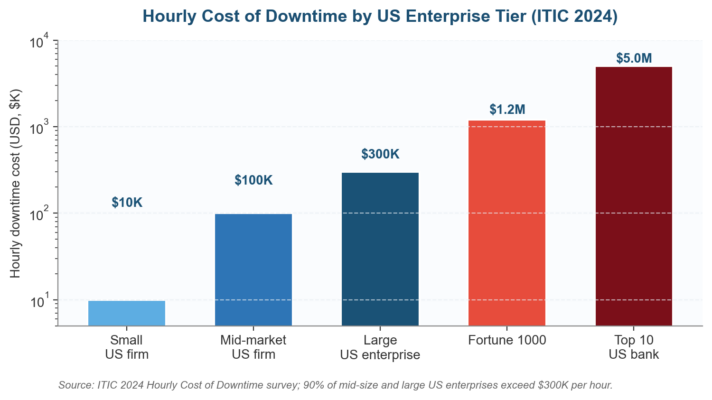
Figure 1. The cost case for a tested disaster recovery plan template: US downtime cost scales an order of magnitude per enterprise tier.
Why a Disaster Recovery Plan Template Matters for US Firms in 2026
US IT outages have moved from periodic disruption to recurring tax. The Uptime Institute 2024 Annual Outage Analysis found 54% of US outages now cost over $100,000 and 16% cross $1 million per event.
IBM’s 2025 Cost of a Data Breach Report put the US average breach at $9.36 million, the highest of any country surveyed. A current disaster recovery plan template is the cheapest insurance against those numbers.
We have watched US public-company boards shift the question from “do we have a DR plan” to “show us when it was last tested and what failed.”
Big Four auditors, OCC and FFIEC examiners, and SEC reviewers under the December 2023 cyber disclosure rule all expect to see a documented, dated, tested disaster recovery plan template before they sign off on operational resilience disclosures. A binder dated 2019 will not survive 2026 scrutiny.
Treat the disaster recovery plan template as a budget-line asset rather than a binder on a shelf. The decision it forces is whether the next ransomware incident costs $50,000 or $50 million.
Keep it as a living artifact: owned by a named executive sponsor, refreshed every twelve months, tested every quarter, and presented to the audit committee inside one integrated resilience report alongside the business continuity management system the firm already runs.
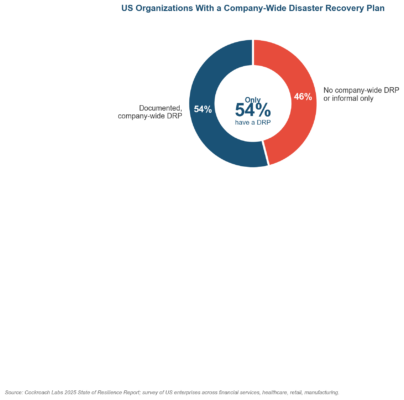
Figure 2. Only 54% of US organizations have a documented disaster recovery plan template; the 46% gap is the audit-committee question.
What a Disaster Recovery Plan Template Actually Covers
A disaster recovery plan template is a documented, structured approach describing how an organization restores IT systems, applications, and data after a disruptive event. It turns chaotic reaction into pre-planned execution when minutes determine the size of the loss.
The template lives inside the broader business continuity plan, focused specifically on technology infrastructure rather than people, processes, suppliers, or facilities. NIST SP 800-34 Revision 1 anchors the federal definition US auditors apply.
Think of the BCP as the umbrella strategy and the disaster recovery plan template as the IT-specific playbook underneath.
The DRP does not replace the BCP. The BCP addresses workforce, communications, third parties, and physical sites.
The DRP zeroes in on servers, networks, databases, cloud services, applications, and the data flowing through them. Both must work together to deliver operational resilience, as ISO 22301:2019 requires.
Disaster Recovery Plan Template vs Business Continuity Plan: Scope Comparison
Understanding the scope split matters because audit committees ask which executive owns which artifact. The disaster recovery vs business continuity plan comparison walks the distinction in detail.
The business impact analysis drives both documents by identifying which processes and systems are critical and what the organization can tolerate in downtime and data loss.
Start there before writing a single line of the disaster recovery plan template, or you will fund the wrong recovery architecture.
| Element | Business Continuity Plan (BCP) | Disaster Recovery Plan (DRP) Template |
| Scope | All business functions: people, processes, IT, facilities, supply chain, customer service. | IT systems, applications, data, network infrastructure, cloud services, backup and restore. |
| Primary Standard | ISO 22301:2019 Security and Resilience BCMS. | NIST SP 800-34 Rev 1 + ISO 22301 Annex A + ISO/IEC 27031:2011. |
| Key Metric | MTPD (Maximum Tolerable Period of Disruption) and MBCO (Minimum Business Continuity Objective). | RTO (Recovery Time Objective) and RPO (Recovery Point Objective) per system tier. |
| Executive Owner | Business Continuity Manager, COO, or Chief Risk Officer. | IT Director, CIO, CISO, or IT Disaster Recovery Coordinator. |
| Testing Focus | Full business tabletop exercises, crisis simulations, dependency drills. | System failover tests, backup restoration drills, network recovery, cyber incident drills. |
| Activation Trigger | Any disruption affecting business operations across functions. | IT system failure, data loss, cyber incident, data center outage, cloud service disruption. |
| Reports to Board | Quarterly via CRO inside the integrated operational resilience review. | Quarterly inside the integrated resilience report, with last-test date and gap actions. |
Table 1. Disaster recovery plan template vs business continuity plan across seven dimensions every US CRO defends to the audit committee.
Disaster Recovery Plan Template Step 1: Classify Systems by Recovery Priority
Not every system in the disaster recovery plan template deserves the same recovery speed. A US payroll engine and a marketing analytics dashboard have very different business impacts when offline.
Tier classification assigns each system a priority level based on the business impact analysis results.
Those tiers then drive the RTO and RPO targets the firm commits to for each system class, and they shape the recovery architecture you will fund.
| Tier | Classification | RTO Target | RPO Target | Recovery Strategy |
| Tier 1 | Mission-Critical: failure halts revenue or creates regulatory breach (ERP, core banking, EHR, e-commerce checkout, claims processing). | 0 – 4 hours | 0 – 1 hour | Hot standby / active-active replication, automated failover, synchronous backup across two US regions. |
| Tier 2 | Business-Essential: supports key operations, short-term workaround available (email, CRM, HR portal, financial reporting, ticketing). | 4 – 24 hours | 1 – 4 hours | Warm standby, asynchronous replication, hourly incremental backups to immutable cloud storage. |
| Tier 3 | Business-Support: enhances productivity, tolerates extended outage (internal wiki, project management, dev/test environments, BI dashboards). | 24 – 72 hours | 4 – 24 hours | Cold standby, daily full backups, restore-from-backup with manual switchover. |
| Tier 4 | Non-Critical: minimal operational impact (archive storage, legacy systems, training sandboxes, decommissioning candidates). | 72+ hours | 24+ hours | Backup only, no standby environment, rebuild from infrastructure-as-code templates if needed. |
Table 2. Disaster recovery plan template system tier classifications, RTO/RPO ceilings, and recovery strategy per tier.
Map every system in your US infrastructure to a tier inside the disaster recovery plan template. Document the mapping in a system inventory spreadsheet alongside the asset owner, hosting location (on-premises, AWS, Azure, GCP, hybrid), backup method, last successful restore date, and recovery SLA with each vendor.
This inventory becomes the master reference for the entire program. Pair it with a risk register template to track IT-specific threats against each tier.
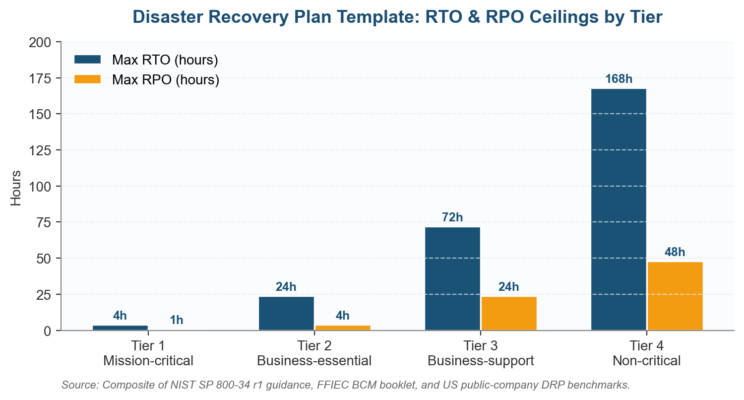
Figure 3. Disaster recovery plan template: maximum RTO and RPO ceilings per system tier. Validate every target through testing.
Disaster Recovery Plan Template Step 2: The Complete 8-Phase IT DRP Checklist
Use this 8-phase checklist as the backbone of your disaster recovery plan template. Each phase maps to ISO 22301 clauses and NIST SP 800-34 Rev 1 sections, giving you audit-ready documentation from day one.
The same structure works for a US community bank, a regional hospital network, a mid-cap manufacturer, or a cloud-first SaaS firm. Adapt the technology details inside each phase, but keep the phase sequence intact.
| # | Phase | Actions | Deliverables |
| 1 | Risk Assessment | Identify threats to IT infrastructure: natural disasters, ransomware and DDoS, hardware failure, power outage, human error, supply-chain disruption. Rate each by likelihood and impact on a 5×5 matrix. | IT threat register with likelihood × impact ratings per threat type. |
| 2 | Business Impact Analysis | Determine which IT systems support critical business functions. Establish RTO, RPO, and MTPD per system. Identify single points of failure and dependency chains across the application stack. | BIA report with system-level RTO/RPO/MTPD, dependency map, single-point-of-failure analysis. |
| 3 | Recovery Strategy Selection | Choose recovery approach per tier: hot/warm/cold standby, cloud-based DRaaS, immutable backup, hybrid. Evaluate cost vs. recovery speed tradeoff. Secure vendor contracts with US data-residency clauses. | Recovery strategy matrix, vendor contracts, cost-benefit analysis per tier. |
| 4 | Plan Documentation | Write the DRP document: activation triggers, team roles, communication tree, step-by-step recovery procedures per tier, vendor contact list, network diagrams, credential-vault location. | Complete disaster recovery plan template, approved by IT Director and executive sponsor. |
| 5 | Team Activation & Roles | Assign DRP team members with primary and backup personnel. Define escalation paths. Distribute contact cards and out-of-band communication channels (satellite phone, personal mobile, signal app). | DRP team roster with roles, alternates, and 24/7 contact details. |
| 6 | Communication Protocol | Define notification sequences: who gets called first, second, third. Pre-draft templates: employee update, customer advisory, SEC 8-K materiality notice, HHS OCR breach notification, vendor escalation. | Communication tree diagram, pre-drafted notification templates, media statement template. |
| 7 | Testing & Exercising | Schedule cadence: tabletop exercise quarterly, functional backup restoration semi-annually, full failover simulation annually, cyber incident drill annually. Record results, measure actual RTO/RPO vs. targets. | Testing calendar, test result reports, gap analysis with corrective actions and named owners. |
| 8 | Maintenance & Review | Review the DRP after every test, every real incident, and at minimum annually. Update system inventory when infrastructure changes. Retrain new team members within 30 days of joining the recovery team. | Annual review report, change log, updated system inventory, training completion records. |
Table 3. The 8-phase IT disaster recovery plan template checklist, mapped to ISO 22301 and NIST SP 800-34 Rev 1.
Disaster Recovery Plan Template Step 3: Assign DRP Team Roles
A disaster recovery plan template without clear ownership is just paper. Every plan needs named individuals, with documented backups, assigned to specific roles.
The IIA Three Lines Model applies here directly: the IT team owns recovery execution as the first line, the risk and BCM function oversees and validates as the second line, and internal audit assures the process as the third line.
Assigning these roles is what converts the document from theoretical into operational.
Store the team roster in at least three US-accessible locations: the disaster recovery plan template document itself, a printed laminated copy at the DR site, and a cloud-based emergency contact system reachable from personal mobile devices.
If the primary data center is down and corporate email is encrypted, the team must reach each other through out-of-band channels: SMS, satellite phone, and a dedicated emergency messaging app. This connects directly to the firm’s operational risk management framework.
Disaster Recovery Plan Template Step 4: Set RTO and RPO Targets
RTO and RPO are the two numbers that define every recovery decision inside the disaster recovery plan template. RTO is how quickly the system must come back online.
RPO is how much data loss the business can tolerate, measured in time since the last good backup. The difference between RPO and RTO guide walks both metrics in operational detail.
These targets come from the business impact analysis, not from vendor sales literature or wishful thinking.
| System | Tier | RTO | RPO | Recovery Method |
| Core Banking Platform / Core EHR | Tier 1 | 2 hours | 15 minutes | Active-active cluster with synchronous replication across two US data centers. |
| Customer-Facing Web Portal | Tier 1 | 4 hours | 1 hour | Cloud-based hot standby with automated Route53/Azure DNS failover. |
| Email & Collaboration (M365 / Google) | Tier 2 | 8 hours | 4 hours | Native geo-redundancy + third-party SaaS backup (e.g., Druva, Veeam). |
| HR & Payroll System | Tier 2 | 12 hours | 4 hours | Warm standby VM in secondary US cloud region, 4-hour snapshot schedule. |
| Regulatory Reporting Platform | Tier 2 | 24 hours | 8 hours | Daily incremental backup, warm standby in alternate US DR region. |
| Internal Knowledge Base / Wiki | Tier 3 | 48 hours | 24 hours | Daily full backup to immutable cloud storage, cold restore procedure. |
| Development & Testing Servers | Tier 4 | 72+ hours | 48 hours | Weekly backup, rebuild from Terraform / CloudFormation templates. |
Table 4. Sample RTO/RPO matrix from a US mid-size financial services firm’s disaster recovery plan template.
Notice how each system’s recovery method maps directly to its RTO and RPO targets in the disaster recovery plan template.
A Tier 1 system with a 2-hour RTO cannot rely on daily tape backup; the math fails. The recovery method must deliver within the target window, validated through testing rather than assumption.
Complement this with the IT risk management process to cover dependencies beyond pure recovery, and tie targets back to the five-step risk management process.
Disaster Recovery Plan Template Step 5: Testing the Plan Before Disaster Strikes
The Cockroach Labs 2025 survey found 62% of US organizations skip regular backup restoration exercises, and 71% perform no failover testing at all.
An untested disaster recovery plan template is a plan that will fail when activated. Scenario analysis works here just as it does in financial risk management: model the failure mode, run the drill, capture the actual numbers, compare against the targets, and close the gaps before the next outage forces the comparison for you.
| Test Type | Frequency | Scope | Duration | Success Criteria |
| Tabletop Exercise | Quarterly | Walk a disaster scenario verbally with the DRP team. Test decision-making, communication flow, role clarity, and decision rights. | 2 – 3 hours | All members articulate role; communication tree reaches all contacts within 30 minutes. |
| Backup Restoration Test | Semi-Annually | Restore Tier 1 and Tier 2 systems from backup to an isolated US environment. Verify data integrity and application functionality. | 4 – 8 hours | Restored systems meet RPO; applications pass functional validation checks. |
| Full Failover Simulation | Annually | Simulate a complete data center failure. Activate DR site. Run critical operations from the DR environment under realistic load. | 8 – 24 hours | All Tier 1 systems meet RTO targets; users complete core transactions from DR site. |
| Cyber Incident Drill | Annually | Simulate a ransomware attack. Test isolation, immutable backup integrity, forensic response, and clean-restoration procedures. | 4 – 8 hours | Ransomware contained within 1 hour; clean restoration within RTO; no data exfiltration. |
| Communication Test | Semi-Annually | Test the emergency notification system. Verify all team members and stakeholders receive alerts within target time. | 1 hour | 95% of contacts confirm receipt within 15 minutes via primary and backup channels. |
Table 5. Disaster recovery plan template testing schedule. Quarterly tabletops are the floor, not the ceiling.
After every test, document results in a formal report tied back to the disaster recovery plan template.
Capture actual RTO and RPO achieved versus target, gaps identified, and corrective actions with named owners and due dates.
Feed the results into your risk assessment process so residual IT risks reflect the true state of your recovery capability, and embed the cycle in your annual risk management lifecycle. Patterns recur: every test surfaces at least one gap the prior test missed.
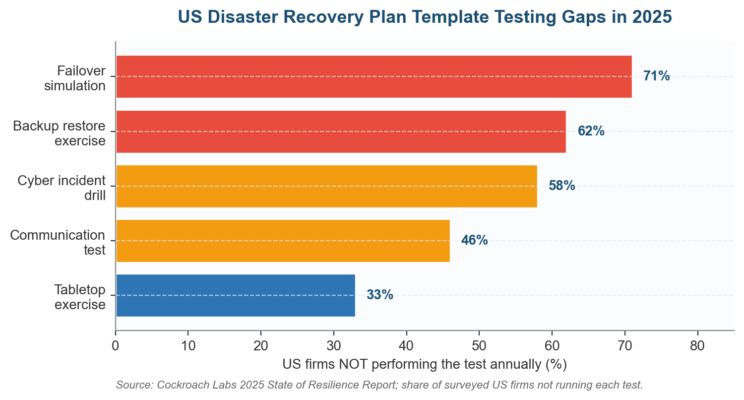
Figure 4. The 2025 testing gap: most US disaster recovery plan template programs still skip the tests that actually matter.
Disaster Recovery Plan Template Implementation Roadmap (90 Days)
A defensible disaster recovery plan template lands in 90 days when ownership is clear, the business impact analysis already exists, and the budget is approved.
Most US firms try to stretch this work over 9 months and watch the program collapse under unrelated priorities.
The 90-day cadence below pressure-tests assumptions early, forces Tier 1 testing before the document is finalized, and gets the executive sponsor reading test results, not draft documents.
| Phase | Actions | Success Metrics |
| Days 1-30: Assess and Classify | Conduct IT threat assessment. Complete BIA for all IT systems. Classify systems into Tiers 1-4. Define RTO/RPO targets. Identify current backup and recovery gaps. Stand up the executive steering committee. | 100% of critical systems classified; RTO/RPO targets approved by CIO and CRO; BIA reviewed by audit committee. |
| Days 31-60: Build and Document | Select recovery strategies per tier. Procure DR infrastructure or DRaaS contracts with US data-residency clauses. Write the full disaster recovery plan template. Assign team roles with primary and backup personnel. Build the communication tree and pre-draft notification templates. | Disaster recovery plan template reviewed and approved by executive sponsor; team members briefed on roles; DR infrastructure provisioned and IPL-tested. |
| Days 61-90: Test and Launch | Conduct the first tabletop exercise. Run a backup restoration test on Tier 1 systems. Validate the communication tree with a live alert test. Document test results and corrective actions. Publish the disaster recovery plan template v1.0 and distribute to all stakeholders. | Tier 1 systems restored within RTO targets during test; all team members confirm receipt and understanding of the DRP; audit committee briefing scheduled. |
Table 6. 90-day disaster recovery plan template implementation roadmap for US firms with an existing business impact analysis.
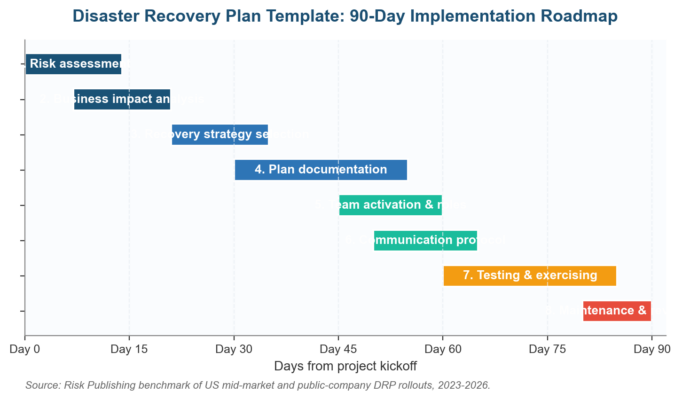
Figure 5. The 90-day disaster recovery plan template roadmap: eight phases compressed into one quarter.
Common Pitfalls in Disaster Recovery Plan Template Adoption
Six failure modes account for nearly every stalled disaster recovery plan template in US firms. None are technical at root; all stem from governance, BIA, or ownership gaps the audit committee can close inside one quarter.
The pattern repeats across community banks, regional hospitals, mid-cap industrials, and SaaS firms scaling past Series C. Naming the trap is the first step toward closing it before the next incident proves the gap exists.
| Pitfall | Root Cause | Remedy |
| DRP written as a compliance shelf-document, never tested. | Plan was created as a compliance checkbox, not an operational tool. | Schedule testing on a fixed calendar: quarterly tabletop, semi-annual restoration, annual failover. Make testing a KPI for the IT Director and the CRO. |
| Unrealistic RTO/RPO targets without budget alignment. | BIA identifies aggressive targets but leadership does not fund the recovery infrastructure to meet them. | Present a cost-vs-RTO tradeoff table to leadership. Show the price of a 2-hour RTO vs. a 24-hour RTO. Let the business decide explicitly and minute the decision. |
| No alternate, out-of-band communication channel. | Team relies entirely on corporate email and Slack, which may be encrypted or unreachable during a disaster. | Establish out-of-band channels: personal mobile group, satellite phone, dedicated emergency messaging app, printed laminated contact cards. |
| Forgetting third-party, SaaS, and cloud dependencies. | DRP covers on-premises systems but ignores SaaS apps, cloud hosting, and critical vendor dependencies. | Map all third-party dependencies. Include vendor recovery SLAs, escalation paths, and contractual right-to-audit clauses in the disaster recovery plan template. |
| Single point of failure in the DRP team itself. | Only one person knows the recovery procedure or holds the credential vault keys. | Assign primary and backup personnel to every role. Store credentials in a break-glass vault accessible to at least three authorized US-based individuals. |
| System inventory drifts out of date. | Infrastructure changes (new servers, decommissioned apps, cloud migrations) are not reflected in the disaster recovery plan template. | Tie DRP updates to the IT change management process. Every infrastructure change triggers a DRP inventory review within 30 days. |
Table 7. Six pitfalls that derail disaster recovery plan template adoption in US firms, with the remedy at each trap.
Disaster Recovery Plan Template Trends Shaping 2026 to 2028
Three trends are pushing the disaster recovery plan template into new territory through 2028. The first is AI-driven threat detection. Nearly half of US firms surveyed are now investing in automation and machine-learning resilience tooling.
Automated failover, self-healing infrastructure, and AI-powered anomaly detection are moving from enterprise-only into the mid-market.
Templates must include AI-augmented playbooks alongside the manual procedures the team falls back on when the model is wrong, as the July 2024 CrowdStrike-Falcon incident showed.
Regulatory pressure is intensifying. The SEC cyber incident disclosure rule started a four-business-day clock from materiality determination, putting the disaster recovery plan template inside the disclosure timeline.
The HHS HIPAA Security Rule NPRM proposes mandatory contingency testing for US healthcare. CISA’s Cyber Resilience Review pulls critical-infrastructure firms toward externally audited impact tolerance. The template can no longer live in an IT silo.
Multi-cloud and hybrid architectures are making recovery more complex. US firms running workloads across AWS, Azure, and GCP need disaster recovery plan template designs that span cloud providers, with cross-region replication and tested failover between them.
The FFIEC Business Continuity Management booklet and the Federal Reserve, OCC, and FDIC Sound Practices on Operational Resilience both elevate end-to-end service continuity over component restoration. Recovery now means service delivery, not just system uptime.
Disaster Recovery Plan Template: Frequently Asked Questions
What is the difference between a disaster recovery plan template and a business continuity plan?
A disaster recovery plan template documents how the IT team restores systems, applications, and data after a disruption. The business continuity plan covers the whole organization including workforce, communications, suppliers, customer impact, finance, and regulatory response.
The DRP is one component inside the BCP. US auditors expect them governed under one integrated CRO program, not as parallel silos producing separate reports.
How often should we test the disaster recovery plan template?
Run a tabletop exercise quarterly, a full backup restoration test semi-annually, and a complete failover simulation annually. Tier 1 mission-critical systems carry their own quarterly DR failover drills.
Refresh the disaster recovery plan template within 30 days after any material incident, acquisition, or major system change. Untested plans fail SEC examinations, OCC and FFIEC examinations, and HHS OCR audits.
What RTO and RPO should I set in my disaster recovery plan template?
Set tier-specific targets driven by the business impact analysis, not vendor marketing literature. Tier 1 mission-critical systems (ERP, core banking, EHR): RTO 0-4 hours, RPO 0-1 hour.
Tier 2 business-essential (email, CRM): RTO 4-24 hours, RPO 1-4 hours. Tier 3 support: RTO 24-72 hours, RPO 4-24 hours. Tier 4 non-critical: 72+ hours and 24+ hours. Validate every target through quarterly testing.
Does a small US business need a disaster recovery plan template?
Yes. The Cockroach Labs 2025 data shows 100% of surveyed US firms lost revenue to IT outages last year, regardless of size. Ransomware does not skip small targets; the FBI Internet Crime Report 2024 documented thousands of US small-business cases.
A scaled-down disaster recovery plan template (10-20 pages instead of 80) still defines tier classification, RTO/RPO targets, backup integrity tests, and the activation contact list.
How does the disaster recovery plan template fit with ISO 22301 and NIST SP 800-34?
ISO 22301:2019 is the global BCMS standard and treats DR as one component. NIST SP 800-34 Revision 1 anchors US federal contingency planning.
ISO/IEC 27031:2011 bridges DRP and BCP for ICT readiness, and the NIST Cybersecurity Framework 2.0 RC (Recover) function aligns with the same architecture.
Building your disaster recovery plan template against the stack gives you audit-ready documentation across all four regulators at once.
Who owns the disaster recovery plan template in a US public company?
Operational ownership sits with the CIO or CISO, who runs the IT recovery teams and the testing calendar. Strategic accountability sits with the Chief Risk Officer or BCM director, who reports an integrated quarterly resilience view to the audit and risk committee.
The board approves the disaster recovery plan template policy annually. SEC and OCC examiners expect a single CRO voice on resilience, not two competing reports.
What backup architecture should the disaster recovery plan template recommend?
Tier 1 systems demand synchronous replication across two US regions with automated failover, validated by quarterly drills. Tier 2 systems use asynchronous replication with hourly incremental backups to immutable cloud storage.
Tier 3 and 4 systems rely on daily snapshots plus weekly fulls with at least one offline air-gapped copy. The disaster recovery plan template documents the architecture, ownership, and last successful restore date for each tier explicitly.
How long should it take to build a disaster recovery plan template from scratch?
A focused 90-day program is realistic for US mid-market firms with an existing BIA. Days 1-30 cover assessment, BIA refresh, and tier classification.
Days 31-60 cover strategy selection, vendor contracting, document drafting, and team assignment. Days 61-90 cover the first tabletop exercise, Tier 1 backup restoration test, communication drill, and approved publication.
Disaster recovery plan template projects stretching past six months usually never finish.
The Bottom Line on Your Disaster Recovery Plan Template
The disaster recovery plan template is not a compliance checkbox. It is the operational manual the IT team opens at 3 AM when ransomware encrypts the production database.
Build it against ISO 22301:2019 and NIST SP 800-34, drive it from a current business impact analysis, classify every system into a tier with a defended RTO and RPO, and test the plan on a calendar before the next outage tests it for you.
Next Steps on Your Disaster Recovery Plan Template
Risk Publishing helps US public-company and mid-market CROs put a disaster recovery plan template into production: ready-to-use templates, BCP frameworks, risk register designs, and engagements that design, test, and maintain resilient IT recovery capabilities.
The World Economic Forum Global Risks Report 2025 ranks cyber and tech disruption inside the top ten global risks; the disaster recovery plan template is the operational answer.
Explore the effective business continuity planning process, the cyber security risk management framework, the BCMS business continuity management system guide, the incident response plan vs business continuity comparison, and the key elements of business continuity management overview to strengthen the program. The operational risk management process and the compliance risk assessment guide close the second-line oversight loop.

Chris Ekai is a Risk Management expert with over 10 years of experience in the field. He has a Master’s(MSc) degree in Risk Management from University of Portsmouth and is a CPA and Finance professional. He currently works as a Content Manager at Risk Publishing, writing about Enterprise Risk Management, Business Continuity Management and Project Management.