On May 10, 2012, JPMorgan Chase announced an initial $2 billion trading loss on a synthetic credit portfolio run from its London Chief Investment Office. By year-end the loss had grown to $6.2 billion.
The January 2013 internal task force report identified an Excel-based VaR model that divided by the sum of two hazard rates instead of their average. The error understated the calculated risk score by roughly half. The trading desk operated on the wrong number for months.
JPMorgan paid $920 million in fines across the OCC, Federal Reserve, SEC, and UK FCA. CEO Jamie Dimon’s 2012 pay was cut from $23 million to $11.5 million.
| The Practitioner Cheat Sheet on Calculating Inherent Risk Score in Excel |
| The inherent risk score formula is Likelihood x Impact, with both axes scored on a 1-5 or 1-10 scale. The score reflects the exposure before any controls. ISO 31000:2018, COSO ERM 2017, PMBOK 7th edition, and most US sector regulators expect this structure. |
| JPMorgan Chase reported a $6.2 billion trading loss in 2012 from the London Whale position. The bank’s January 2013 task force report attributed part of the failure to an Excel-based VaR model that divided by the sum of two hazard rates instead of their average, understating the risk score by roughly half. JPMorgan paid $920 million in fines across the OCC, Federal Reserve, SEC, and FCA. |
| A working Excel inherent risk score model has six steps: set up the worksheet columns, build the likelihood and impact dropdowns, write the score formula, apply conditional formatting, build the heat map, validate the model. The full build takes one afternoon at a US mid-size institution. |
| The standard 5×5 inherent risk score grid uses four bands. Low (1-5) is accept and monitor. Moderate (6-10) is monitor and improve controls. High (11-15) is treat within 90 days with board visibility. Critical (16-25) is treat now with CRO and board sign-off. |
| Inherent risk score is not residual risk score. The inherent score is exposure before controls; the residual score is exposure after current controls. Excel models should track both in adjacent columns and use the gap to drive the treatment plan. |
| Every Excel risk model needs three safeguards: locked formulas, version control, and peer review. The JPMorgan failure happened in a spreadsheet that was migrated by manual copy-paste, used a formula nobody validated, and was treated as authoritative by the trading desk. The safeguards exist because the failure mode is real. |
| The Excel inherent risk score model is the entry point, not the destination. As the program matures, the model moves to a GRC platform (Archer, OneTrust, ServiceNow GRC, Resolver) that carries the same formula structure but adds workflow, audit trail, and integration with the operational risk log. |
The US Senate Permanent Subcommittee on Investigations report of March 14, 2013 ran to 307 pages. The Excel formula error was a small but central part of the failure, and the case has been on every model-risk syllabus in US banking ever since.
Calculating an inherent risk score in Excel correctly is the most common risk-team task in the US, and it remains under-tested at most institutions. This walkthrough takes you through the formula, the six-step Excel build, the 5×5 heat map, and the validation safeguards the JPMorgan case turned into standard practice. Our key elements of a risk register page anchors the upstream structure.
Why Calculating Inherent Risk Score Correctly Matters (JPMorgan London Whale 2012)
The London Whale case is the cleanest published example of an Excel inherent risk calculation going wrong at scale. The trader, Bruno Iksil, accumulated outsized CDS positions through the Synthetic Credit Portfolio. The risk function approved those positions based on a VaR model whose Excel formula was incorrect.
The bug: when the new VaR model copied old and new hazard rates into the spreadsheet, the formula calculated relative change by subtracting the old rate from the new rate, then dividing by their sum rather than their average. The result understated VaR by approximately 50% for the portfolio. The position size that the bank approved was double what the corrected model would have allowed.
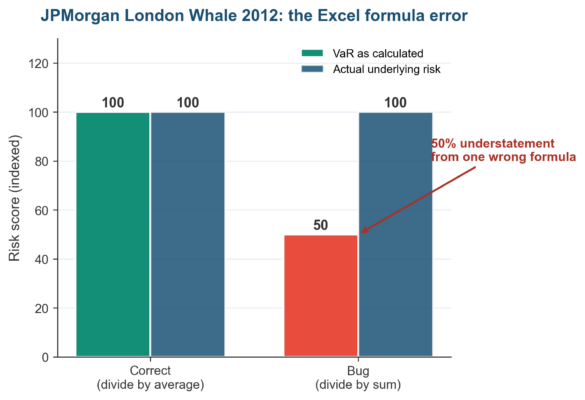
Figure 1. The JPMorgan London Whale 2012 Excel formula error. Dividing by sum instead of average produced an indexed VaR of 50 when actual underlying risk was 100.
The lesson for every US risk team: a single wrong cell in a spreadsheet, copied into production, can cost billions. Inherent risk score Excel models need locked formulas, named ranges, peer review, and version control. Our how to conduct a risk assessment page carries the broader methodology.
Inherent Risk Score Formula: The Standard Likelihood x Impact Method
The standard inherent risk score formula is Likelihood multiplied by Impact, where both factors are scored on a 1-5 scale and the product ranges from 1 to 25. ISO 31000:2018, COSO ERM 2017, PMBOK 7th edition, and most US sector regulators expect this structure. The simplicity is the point: a board member can read a score of 20 and understand it carries more exposure than a score of 4.
The Inherent Risk Score = Likelihood x Impact Definition
Inherent risk score is the exposure before any controls are applied. Likelihood measures how often the threat is expected to materialize within the assessment period. Impact measures the severity of the consequences if the threat does materialize.
The product of those two factors is the inherent risk score. Our definition of likelihood in risk assessment page defines the likelihood axis precisely. The impact axis is harder to standardize and usually requires a per-category calibration the risk function publishes once a year.
Selecting Scoring Scales for Inherent Risk (1-5 vs 1-10)
The two scoring scales in widespread use are 1-5 and 1-10. The 1-5 scale produces a 25-point inherent risk score range and pairs naturally with a 5×5 heat map. The 1-10 scale produces a 100-point range and gives finer differentiation between similar risks.
US enterprises overwhelmingly use 1-5 because board members read it faster. The 1-10 scale shows up at quantitative-finance institutions and at firms running ISO 27005 (information security) assessments. Pick one scale and stick with it across all enterprise registers.
Inherent Risk Score Bands: Low, Moderate, High, Critical
The 25-point inherent risk score range maps to four conventional bands. Each band carries a recommended action. The bands are how the score connects back to the risk appetite the board approved.
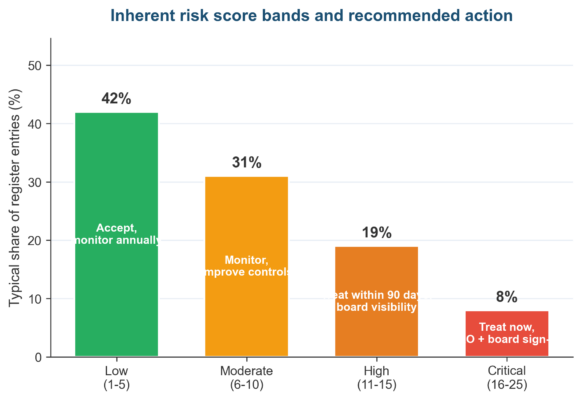
Figure 2. The four inherent risk score bands and the recommended action for each, with the typical distribution across a US enterprise risk register.
Step-by-Step: Calculate Inherent Risk Score in Excel
Building an inherent risk score model in Excel takes one afternoon at a US mid-size institution. Six steps run in order. The output is a working register with auto-calculated scores, conditional color coding, and a heat map view. No macros or VBA required.
Step 1: Set Up the Inherent Risk Score Excel Worksheet
Open a blank workbook. Rename Sheet1 to Risk Register. Add column headers in row 1: Risk ID, Risk Description, Category, Likelihood (1-5), Impact (1-5), Inherent Score, Band, Owner, Last Reviewed.
Freeze the top row using View > Freeze Panes > Freeze Top Row. Set column widths so that descriptions wrap and scores are visible without scrolling. The worksheet is now ready to receive risk entries.
Step 2: Build the Likelihood and Impact Dropdown Lists
Add a second worksheet named Scales. List the 1-5 values for Likelihood (Rare, Unlikely, Possible, Likely, Almost Certain) with their definitions. Repeat for Impact (Negligible, Minor, Moderate, Major, Severe). Define named ranges for each list.
Back on the Risk Register sheet, use Data Validation on the Likelihood and Impact columns to restrict entries to the 1-5 range using the named ranges. The dropdown forces consistency across raters and stops free-text scores from ever entering the workbook.
Step 3: Write the Inherent Risk Score Formula
In cell F2 (Inherent Score, first risk row) enter: =D2*E2 where D is Likelihood and E is Impact. Fill down to all populated rows using the fill handle. The formula is the literal Likelihood x Impact product.
For models needing weighted scores, use =D2*E2*W where W is a weight cell on the Scales sheet. Common weights add velocity (how fast the risk moves) or vulnerability (how exposed the institution is). Keep the formula simple unless the program demands the extra factor.
Step 4: Apply Conditional Formatting to the Risk Score
Select the Inherent Score column. Open Conditional Formatting and create four rules. Score 1 to 5 fills green, 6 to 10 fills amber, 11 to 15 fills orange, 16 to 25 fills red. The board reads the colors first and the numbers second.
Step 5: Build the Inherent Risk Heat Map in Excel
Add a third worksheet named Heat Map. Create a 5×5 grid with Likelihood on the vertical axis (1 at bottom, 5 at top) and Impact on the horizontal axis (1 at left, 5 at right). In each cell, enter the inherent score (product of row and column). Apply the same color bands as the register.
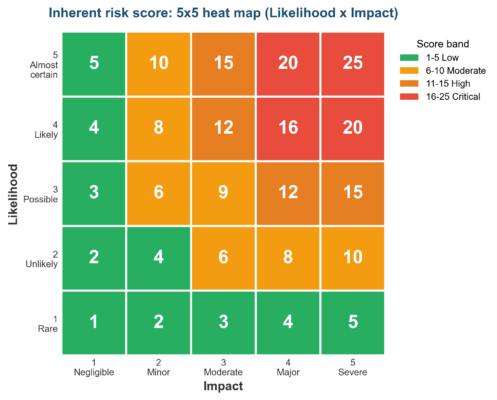
Figure 3. The 5×5 inherent risk score heat map. The shape every audit committee in the US recognizes.
Layer a COUNTIFS formula on top to show how many of your register entries fall in each cell. The board reads the cluster pattern at a glance. Hotspots in the top-right quadrant flag where the most concentrated work needs to happen.
Step 6: Sort and Filter the Inherent Risk Register
Apply Excel’s Filter feature to the header row. The audit committee can now sort by Inherent Score descending, filter by Category, or pull all Critical-band entries onto one screen. The filter view is what gets exported to the board pack each quarter.
Advanced: Risk-Weighted Inherent Risk Score in Excel
The basic Likelihood x Impact formula works for 90% of US enterprise risk registers. Three advanced extensions handle the remaining 10%. Velocity. Differential weighting. Multi-scenario calculation. Each extension stays inside Excel without requiring add-ins.
Add Velocity to the Inherent Risk Score Formula
Velocity measures how fast a risk can move from low to high impact. A cyber breach can escalate in hours; a regulatory change unfolds over years. Add a Velocity column (1-3 scale) to the register and multiply: Score = Likelihood x Impact x Velocity.
The product range expands to 1-75, and the bands need recalibration. The velocity-adjusted score is especially useful for boards trying to prioritize incident-response investment versus long-cycle compliance work. Excel handles the extra factor natively without any new tools.
Weight Likelihood and Impact Differently in Excel
Some risk programs weight impact more heavily than likelihood, on the principle that a low-likelihood high-impact event still demands strong controls. The weighted formula is Score = (Likelihood x Wl) x (Impact x Wi) where Wl and Wi sum to 2.0. Common choice: Wl = 0.7, Wi = 1.3, putting more weight on impact.
Calculate Inherent Risk Score With Multiple Scenarios
For high-impact risks, calculate three inherent scores: best case, base case, worst case. Use Excel’s Scenario Manager (Data > What-If Analysis > Scenario Manager) to switch between Likelihood and Impact assumptions. The board sees the score range rather than a single number, which captures uncertainty without leaving Excel.
Multi-scenario scoring is especially useful at the audit committee level when the inherent risk involves a regulatory action, a market shock, or a third-party concentration event. Showing a Critical-band score in the worst case can unlock budget that a single base-case score in the High band would not. Document each scenario’s assumptions in a Notes column.
Common Excel Mistakes When Calculating Inherent Risk Score
Five Excel mistakes recur across US institutions when teams calculate inherent risk score for the first time. Each one corresponds to a documented failure mode in audit and regulator findings. Fix these before publishing the model.
| Mistake | What Happens | Fix |
| Off-by-one likelihood scale | Scale labeled 0-4 in some rows, 1-5 in others. Average scores drift by 20% | Use Data Validation with named ranges. Lock the Scales sheet |
| SUM instead of AVERAGE | Aggregating multiple sub-risks with SUM understates aggregate inherent score | Use AVERAGE or weighted average. JPMorgan 2012 is the case here |
| Inherent and residual in same column | Reviewers confuse before-controls and after-controls scores | Two separate columns: Inherent Score and Residual Score. Track the gap |
| Free-text scores | Raters type ‘3-4’ or ‘medium’ instead of an integer | Data Validation = integer 1 to 5 only. Reject other entries |
| Conditional formatting on wrong cells | Color formatting on Likelihood column instead of Inherent Score | Apply Conditional Formatting to Inherent Score column only |
| Hard-coded threshold values | Band thresholds (5, 10, 15) typed into each rule rather than referenced | Put band thresholds in named cells. Reference them in the rules |
| No version control | Multiple copies of the workbook with different formulas in production | OneDrive or SharePoint version history. Lock the file once published |
Validating Your Inherent Risk Score Excel Model
Validation is the step that turns a working spreadsheet into a board-trusted artifact. Validation costs less than re-doing the entire register after an audit finding. The JPMorgan case is a $920 million reminder that a working spreadsheet is not the same as a validated one. Our RCSA risk management page carries the self-assessment cadence that surrounds the model.
Three Validation Checks Every Excel Risk Model Needs
Lock the formulas. Use Excel’s Protect Sheet feature to prevent edits to the Inherent Score column and the band thresholds. Unlock only the input cells (Likelihood, Impact, descriptions).
Version-control the file. Save the workbook to OneDrive or SharePoint so that version history is preserved. The risk committee can compare the current model against any prior version and trace exactly when a threshold or formula was changed.
Peer-review before sign-off. A second risk team member spot-checks 10% of register entries by recomputing the score by hand. This is the step JPMorgan’s CIO unit skipped in early 2012, and the step every audit committee now demands evidence for.
Frequently Asked Questions About Inherent Risk Score Calculation
What Is the Inherent Risk Score Formula?
How Does Inherent Risk Score Differ From Residual Risk Score?
What Scale Should I Use to Calculate Inherent Risk Score?
How Do I Build an Inherent Risk Heat Map in Excel?
Create a 5×5 grid on a separate worksheet with Likelihood on the vertical axis (1 at bottom, 5 at top) and Impact on the horizontal axis (1 at left, 5 at right). Enter the score (product of row and column) in each cell. Apply conditional formatting with the four bands.
Layer a COUNTIFS formula to show how many register entries fall in each cell. The result is the canonical 5×5 inherent risk heat map every audit committee in the US recognizes.
Can I Use Excel for Enterprise Inherent Risk Scoring?
How Often Should I Recalculate Inherent Risk Scores?
What Is the Right Inherent Risk Threshold for Escalation?
How Do I Validate My Inherent Risk Score Excel Model?
Validate the model with three checks. Lock formulas using Excel’s Protect Sheet. Version-control the file on OneDrive or SharePoint with audit-trail access.
Peer-review 10% of register entries by recomputing scores manually with a second risk team member. The JPMorgan 2012 case is the textbook reminder that a working spreadsheet is not the same as a validated one.
Inherent Risk Score Excel Pitfalls (Common Errors)
Seven patterns surface repeatedly in audit and regulator findings when inherent risk score Excel models go wrong at US institutions. The table captures the recurring miss, the root cause, and the remedy. The JPMorgan 2012 case is hidden inside three of the rows below.
Internal audit and external auditors test for these patterns when reviewing the Excel model in the run-up to any major regulator examination. Pre-empting each one before the audit cycle starts is cheaper than fixing the same finding twice. Our risk-based internal audit guide anchors the audit-side perspective.
| Pitfall | Root Cause | Remedy |
| Wrong aggregation formula | SUM used where AVERAGE belonged, or division-by-sum instead of division-by-average | Peer-review every formula. Spot-check with manual recomputation. JPMorgan 2012 is the case study |
| Manual copy-paste between worksheets | Workbook migrated by copy-paste rather than formula references | Use direct cell references and named ranges. Never copy values where a formula reference works |
| Likelihood and Impact scales drift apart | Scales redefined per business unit without central control | One Scales sheet referenced by all registers. Lock the sheet |
| Inherent and residual scores mixed | Single Score column without before-controls / after-controls split | Two columns: Inherent Score and Residual Score. Document the control assumption for residual |
| No conditional formatting validation | Color bands typed into format rules rather than referenced | Band thresholds live in named cells. Reference them in Conditional Formatting |
| File saved over with no version history | Workbook saved to local drive or shared as email attachment | OneDrive or SharePoint with version history. Lock the published version |
| Board pack pulled directly from working file | No separation between the working register and the board-pack export | Quarterly snapshot exported to PDF or static workbook. Working file continues; snapshot is immutable |
Looking Ahead: AI and Inherent Risk Score Calculation in 2026-2027
Three forces will reshape inherent risk score calculation at US enterprises between 2026 and 2027. The first is AI-assisted scoring. GRC platforms now suggest Likelihood and Impact values from operational log patterns, with the human rater confirming or overriding. The work shifts from typing to validating.
The second force is regulator scrutiny of spreadsheet models. The OCC, FRB, and SEC have all cited model risk management failures rooted in Excel spreadsheets in recent enforcement actions. SR 11-7 from the Federal Reserve treats spreadsheet risk models as model risk that requires the same governance as any other model. Our guide to audit risk assessment page anchors the audit-committee read.
The third force is integration with the operational risk log. Verizon’s 2025 DBIR found 30% of all breaches involved a third party. Inherent risk scores on vendor risks now update on every SOC 2 report, every published advisory, and every regulator action against a critical vendor.
Static quarterly scoring is fading; dynamic scoring informed by the operational log is replacing it. Our how to manage third party risk page carries the workflow that connects the log to the score. The Excel model that ignores log feeds will fall behind the GRC platforms that consume them in real time.
The US enterprise that builds a validated Excel inherent risk score model in 2026, migrates it to a GRC platform by 2027, and connects scores to the operational risk log is the institution that absorbs all three forces with the smallest GRC rewrite. The Excel model is the entry point. The validation discipline behind it carries the program forward into the GRC-platform era.
Infographic: The Six-Step Excel Inherent Risk Score Build
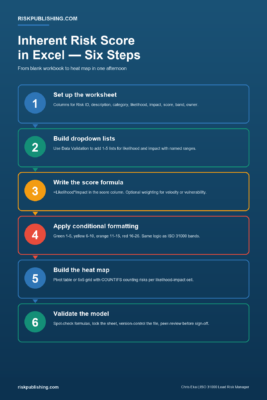
Figure 4. The six-step Excel build for calculating inherent risk score from blank workbook to validated, board-ready heat map.
Next Steps With Your Inherent Risk Score Excel Model
Risk Publishing helps US enterprises build and validate the Excel inherent risk score model that anchors the enterprise risk register, then migrate it to a GRC platform when scale demands. Review the advisory services page to see how the engagement runs, and contact the practice when inherent risk scoring is the next ite

Chris Ekai is a Risk Management expert with over 10 years of experience in the field. He has a Master’s(MSc) degree in Risk Management from University of Portsmouth and is a CPA and Finance professional. He currently works as a Content Manager at Risk Publishing, writing about Enterprise Risk Management, Business Continuity Management and Project Management.