In 2012, JPMorgan Chase turned a $2 billion trading loss in its London Chief Investment Office into a $6.2 billion one by year-end. A core cause was a spreadsheet model that scored risk on the wrong math, understating the exposure by roughly half.
A risk assessment matrix template is the control that should have caught it. The template scores every risk on likelihood and impact, color-codes the result, and forces a critical exposure to show up red instead of hiding inside a number nobody questioned.
| The Practitioner Cheat Sheet on the Risk Assessment Matrix Template |
| A risk assessment matrix template scores each risk by likelihood (1-5) and impact (1-5), multiplies the two for a 1-25 inherent score, and color-codes the result so the worst risks show up red. ISO 31000, IEC 31010, ISO 27001, SOC 2, and COSO ERM all expect this structure. |
| The 5×5 grid is the US default. Its 25 cells separate risks without the false precision of a 10×10 matrix or the bluntness of a 3×3, which is why boards and auditors read it fastest. |
| The four color bands carry the action: green (1-5) accept and monitor, amber (6-10) improve controls, orange (11-15) treat within 90 days, red (16-25) treat now with board sign-off. Some frameworks band 1-4, 5-9, 10-16, 17-25 instead. |
| Every complete template has six parts: a likelihood axis, an impact axis, the score, the color bands, a named owner, and a review date. The owner and review date are the fields teams skip, and the reason most matrices go stale. |
| JPMorgan’s 2012 London Whale loss grew to $6.2 billion partly because a spreadsheet model divided by the sum of two hazard rates instead of their average, halving the score. The bank paid $920 million in fines. A wrong input drops a critical risk two color bands. |
| Build it in Excel in an afternoon: six columns, two 1-5 dropdown scales, a likelihood-times-impact formula, and four conditional-formatting rules referencing band thresholds in named cells. No macros required. |
| Calibrate impact per category in real numbers, and refresh quarterly at the enterprise level with monthly updates for cyber, third-party, and model risk. Static annual scoring no longer meets the continuous-monitoring expectation in NIST CSF 2.0. |
The 5×5 color-coded matrix is the most common risk scoring tool in US enterprises, and it lives in a corner of nearly every
risk register template in Excel. Built right, it turns a list of worries into a ranked, board-ready picture in an afternoon.
Built wrong, it does what JPMorgan’s model did, putting confidence behind a number that is off by a band. Getting the grid, the color bands, the Excel build, and the validation right is what separates a board-ready
risk assessment from a false sense of safety.
What a Risk Assessment Matrix Template Is (and Why 5×5 Wins)
A risk assessment matrix template is a grid that scores each risk by how likely it is and how hard it would hit, then color-codes the result so the worst risks stand out. Where the matrix sits among the
types of risk assessment, and when stakes demand moving beyond it, is covered in the taxonomy guide. The axes run 1 to 5. The product runs 1 to 25, and the colors run green to red.
The payoff is speed and defensibility. A finished template ranks a hundred risks in a single colored view, gives every red cell an owner and a date, and produces the exact picture an auditor or board director expects. That is why it is the first scoring tool most US risk teams build.
The Risk Assessment Matrix Template in Plain Terms
Picture a five-by-five grid. Likelihood climbs the vertical axis from Rare to Almost certain, while impact runs along the horizontal from Negligible to Severe. Each cell holds the product of its row and column, and that number is the
inherent risk score.
The template is not the whole risk assessment; it is the scoring layer. It sits on top of the
risk register, taking identified risks and turning them into a ranked, colored picture an audit committee can read in seconds. Everything upstream of the score still happens in the register itself.
Read one cell to see how it works. A data-center outage rated Likely (4) on probability and Major (4) on impact lands on a score of 16, the bottom of the red Critical band. The color tells the committee to act before anyone reads the description.
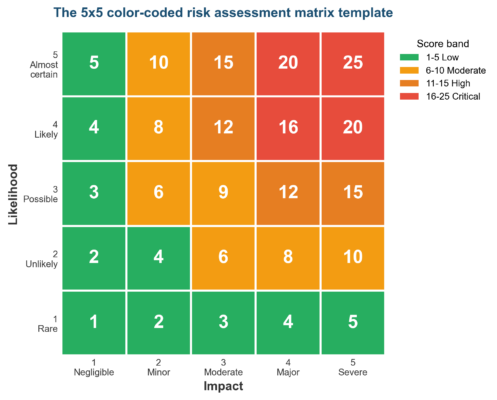 Figure 1. The 5×5 color-coded risk assessment matrix template. Likelihood times impact produces a 1-25 score mapped to four action bands.
Why the 5×5 Risk Assessment Matrix Template Dominates
Matrix size is a resolution choice. A 3×3 grid offers nine cells and blurs medium risks together; a 10×10 grid offers a hundred and drowns a board in false precision. The 5×5 risk assessment matrix template sits in the middle with 25 cells, enough to separate risks without overwhelming the reader.
That balance is why
ISO 31000,
IEC 31010, ISO 27001, SOC 2, and
COSO ERM programs all default to the 5×5. The board reads the color first and the number second, and 25 gradations give that read enough nuance to act on.
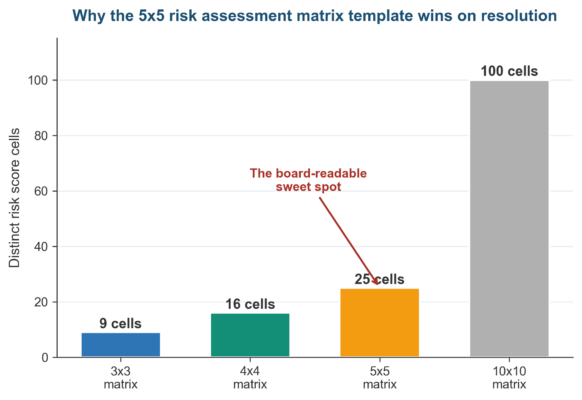 Figure 2. Why the 5×5 risk assessment matrix template wins on resolution: enough cells to rank risks, few enough to stay readable.
| Matrix Size |
Cells |
Best For |
Trade-off |
| 3×3 |
9 |
Quick safety checks, small teams |
Blurs medium risks into one band |
| 4×4 |
16 |
Forcing a decision with no neutral middle |
No central rating; can feel arbitrary |
| 5×5 |
25 |
Enterprise registers, board reporting |
The US standard; balances nuance and clarity |
| 10×10 |
100 |
Quantitative or model-heavy teams |
False precision; hard for a board to read |
The matrix is one tab; the
risk register is the workbook around it. The grid scores and colors the risks, while the
risk register guide holds the descriptions, controls, owners, and treatment plans. The two ship together in one Excel file the board pack draws from.
Anatomy of the Color-Coded Risk Assessment Matrix Template
Every color-coded risk assessment matrix template has the same six parts. They are a likelihood axis, an impact axis, the score, the color bands, a named owner, and a review date. Miss any one and the template either misleads or quietly goes stale.
Likelihood and Impact Scales in the Risk Assessment Matrix Template
The likelihood scale rates probability from 1 (Rare) to 5 (Almost certain), usually tied to a frequency such as once in five years versus once a quarter. The
impact and likelihood axes are the backbone of the matrix, so both deserve written definitions, not raters guessing.
Impact is the axis teams get wrong. A $50,000 loss is catastrophic to a nonprofit and a rounding error to a bank, so the risk assessment matrix template needs a calibration table that defines each level in the organization’s own numbers.
Tie each likelihood level to a number so raters stop guessing. Rare might mean once in ten years, Unlikely once in five, Possible once a year, Likely once a quarter, and Almost certain monthly or more. Written anchors make two raters land on the same score.
The Four Color Bands of the Risk Assessment Matrix Template
The 1-to-25 score maps to four color bands, and the colors carry the action. Green (1-5) is accept and monitor; amber (6-10) is monitor and improve controls; orange (11-15) is treat within 90 days; red (16-25) is treat now with board sign-off.
Some frameworks band the score differently, using 1-4 green, 5-9 yellow, 10-16 orange, and 17-25 red. Either convention works as long as the risk assessment matrix template applies one banding consistently and the thresholds live in named cells, not typed into each rule.
Color does the cognitive work a number cannot. A board scanning forty rows sees the red cells in one pass and never has to compute a single score. That is the whole point of color-coding the matrix rather than leaving raw numbers in a column.
| Band |
Score |
Color |
Recommended Action |
| Low |
1-5 |
Green |
Accept and monitor on the annual cycle |
| Moderate |
6-10 |
Amber |
Monitor and improve controls this quarter |
| High |
11-15 |
Orange |
Treat within 90 days with board visibility |
| Critical |
16-25 |
Red |
Treat now; CRO and board sign-off required |
The Owner and Review Date in the Risk Assessment Matrix Template
A score with no owner is a number nobody answers for. Every row in the risk assessment matrix template needs one accountable owner, so a red cell always traces to a person who can move on it rather than a department that cannot.
The review date is the field that keeps the matrix honest. A risk scored once and never revisited drifts out of date the moment conditions change, so the template carries a
review cadence that tells the committee when each score was last confirmed.
The review date also drives escalation. When a red-band score passes its review date without a refresh, the template should flag it, because an unrefreshed critical risk is a governance gap an examiner will find. A conditional-formatting rule on the date column handles it automatically.
How to Build the Risk Assessment Matrix Template in Excel
Building a risk assessment matrix template in Excel takes one afternoon and no macros. The work is six columns, two dropdown scales, one multiplication formula, and four conditional-formatting rules. Our guide to
calculating the inherent risk score in Excel carries the full formula walkthrough.
Excel is the right home for the first three years of a program. It handles registers up to roughly 150 entries cleanly, and the formula structure migrates straight into a GRC platform when scale demands. Start in the grid, graduate to the platform, and keep the same math.
Six Columns Every Risk Assessment Matrix Template Needs
Open a blank workbook and add columns for Risk ID, description, category, likelihood, impact, and score, then owner and review date. Restrict the likelihood and impact columns to 1-5 with Data Validation so no rater can type a free-text rating into the matrix.
The score column is a single formula, likelihood times impact, filled down the register.
Completed risk assessment examples scored on this matrix show the finished product. Keep that column locked once the template is published, because the one cell a reviewer overwrites by hand is the cell that breaks the
audit trail.
Validate the template before you publish, not after the audit. A second reviewer recomputes ten percent of the scores by hand, confirms the dropdowns reject out-of-range entries, and checks the locked formula against every row. The
self-assessment check costs an hour and prevents the London Whale failure mode.
Color-Coding the Risk Assessment Matrix Template With Conditional Formatting
Select the score column and add four conditional-formatting rules, one per band, referencing the band thresholds in named cells rather than typed numbers. The template now colors itself as raters enter scores, and the board reads the register the way it reads a traffic light.
Layer a small 5×5 summary grid on a separate tab with a COUNTIFS formula that counts how many register entries fall in each cell. That heat map view shows the board where risks cluster, and a
risk score hotspot in the top-right corner flags where the work concentrates.
Export a static snapshot for the board pack each quarter. The working matrix keeps changing as raters update scores, so the version that reaches the committee should be a frozen PDF or a locked copy. Mixing the live file and the board pack is how stale numbers reach a decision.
| Column |
Purpose |
Excel Setting |
| Risk ID |
Unique reference for tracking and reporting |
Plain text, sequential |
| Likelihood (1-5) |
Probability rating from Rare to Almost certain |
Data Validation, integer 1-5 |
| Impact (1-5) |
Severity rating from Negligible to Severe |
Data Validation, integer 1-5 |
| Score |
Inherent risk score for the band and color |
Formula = Likelihood x Impact, locked |
| Owner |
The one person accountable for the risk |
Data Validation from a names list |
| Review date |
When the score was last confirmed |
Date format; drives the refresh cadence |
When the Risk Assessment Matrix Template Math Fails: London Whale
The London Whale case is the cleanest published example of matrix-style scoring failing at scale. JPMorgan’s value-at-risk model, run in a spreadsheet, divided by the sum of two hazard rates instead of their average. That
January 2013 task force report found the error halved the calculated risk and let an outsized position pass review.
Translate that into the matrix and the effect is brutal. A risk whose true inherent score was 20, deep in the red Critical band, showed up as a 10 in amber Moderate, and the desk treated it as a manageable exposure for months.
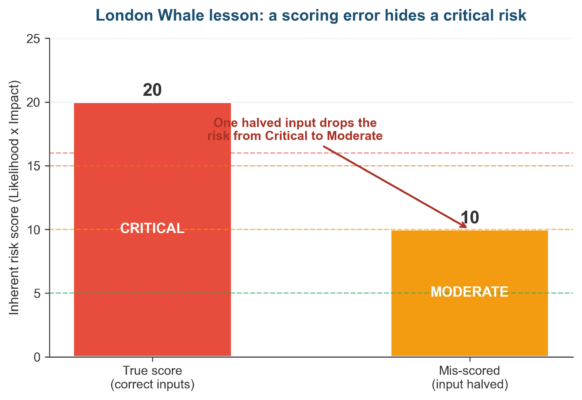 Figure 3. The London Whale lesson for any risk assessment matrix template: one halved input drops a critical risk two color bands and hides it from the board.
JPMorgan paid
$920 million in fines across the
OCC, Federal Reserve, SEC, and UK FCA, and the
US Senate’s 307-page report made the spreadsheet error a permanent case study. A wrong input hides a critical risk in plain sight. That is the precise failure a color-coded matrix exists to prevent.
The fix is validation, not a fancier tool. Lock the formula, put the band thresholds in named cells, version-control the file, and have a second reviewer recompute a sample, the same
SR 11-7 model discipline US regulators now expect of spreadsheet models.
Spreadsheets fail in predictable ways, and the London Whale hit all of them. The model was migrated by manual copy-paste, used a formula nobody validated, and was trusted as authoritative by the desk. Each of those is a control a disciplined matrix build removes.
Customizing the Risk Assessment Matrix Template by Risk Category
One risk assessment matrix template rarely fits every risk type. Cyber risk moves in hours, strategic risk over years, and compliance risk in regulatory cycles. The likelihood and impact definitions need a per-category calibration layer the template publishes once a year.
A hospital and a bank can run the same grid and still score the same event differently. A four-hour systems outage is a level-2 inconvenience for a retail bank and a level-5 patient-safety event for a hospital. The calibration tab, not the grid, carries that judgment.
Calibrating Impact in the Risk Assessment Matrix Template
Build a calibration tab that defines what each impact level means for each category in concrete numbers. A level-5 financial impact might be a $10 million loss; a level-5 cyber impact might be 72 hours of downtime; a level-5 compliance impact might be a consent order.
Velocity is the factor most templates miss. A cyber breach reaches full impact in hours while a regulatory shift unfolds over years, so high-velocity categories such as cyber,
third-party, and model risk warrant a tighter review cadence than the annual enterprise refresh.
Score inherent and residual risk on the same matrix, in adjacent columns. The inherent score is the exposure before controls; the residual is what remains after they work, and the gap between the two colors is the value the controls deliver. Track both, because the board funds the gap.
| Risk Category |
Velocity |
Level-5 Impact Example |
Review Cadence |
| Cyber |
Hours |
72+ hours of downtime or a major breach |
Monthly |
| Third-party |
Days |
Critical vendor failure or SOC 2 lapse |
Monthly |
| Financial |
Weeks |
$10M+ loss or covenant breach |
Quarterly |
| Compliance |
Cycles |
Consent order or regulatory action |
Quarterly |
| Strategic |
Years |
Loss of a core market or business line |
Annual |
Frequently Asked Questions About the Risk Assessment Matrix Template
What Is a Risk Assessment Matrix Template?
A risk assessment matrix template is a color-coded grid that scores each risk by likelihood and impact, usually on a 1-5 scale, to produce an inherent score from 1 to 25. The colors, green through red, rank the risks so the most severe ones get attention first. ISO 31000, IEC 31010, and COSO ERM all expect this structure.
What Size Should a Risk Assessment Matrix Template Be?
The 5×5 risk assessment matrix template is the US default because its 25 cells separate risks without the false precision of a 10×10 grid. Smaller 3×3 templates suit quick safety checks, while 5×5 suits enterprise registers and satisfies
ISO 27001,
SOC 2, and
NIST RMF expectations.
How Do You Color-Code a Risk Assessment Matrix Template in Excel?
Apply four conditional-formatting rules to the score column, one per band, with the thresholds stored in named cells. Green covers 1-5, amber 6-10, orange 11-15, and red 16-25. The template then colors itself as raters enter scores, with no manual formatting.
What Goes in a Risk Assessment Matrix Template?
A complete risk assessment matrix template holds six parts: a likelihood axis, an impact axis, the likelihood-times-impact score, the color bands, a named risk owner, and a review date. The owner and review date are the two fields teams skip, and they are why most matrices go stale.
Is a Risk Assessment Matrix Template the Same as a Risk Register?
No. A
risk register is the full record of every identified risk, its controls, owner, and treatment plan. The risk assessment matrix template is the scoring and color-coding layer that ranks those entries, and it usually lives as a tab inside the register workbook.
How Often Should You Update a Risk Assessment Matrix Template?
Refresh the enterprise risk assessment matrix template quarterly, with an annual deep review to satisfy ISO 31000 and COSO ERM. High-velocity categories such as cyber, third-party, and model risk need monthly or event-driven updates. Static annual scoring no longer meets the continuous-monitoring expectation in
NIST CSF 2.0.
Where Can I Download a Risk Assessment Matrix Template?
Risk Publishing offers a free
risk register template in Excel with a built-in 5×5 heatmap, descriptor scales, and a dashboard. It pairs the matrix scoring layer with the register, so the color-coding updates automatically as you score each risk. Build your own in an afternoon or start from the download.
Can I Use a Risk Assessment Matrix Template for Project Risk?
Yes. The same likelihood-times-impact grid scores project risks, with impact tied to schedule, budget, and scope instead of enterprise dollars.
PMI’s project risk practice uses the identical 5×5 structure, so a manager can lift the template and recalibrate the impact column for the project.
Risk Assessment Matrix Template Pitfalls (Common Errors)
Seven errors recur when US teams build a risk assessment matrix template, and each surfaces in audit and regulator findings. The table pairs the recurring miss with its root cause and the remedy. Three of these rows are the exact failure that cost JPMorgan $920 million.
| Pitfall |
Root Cause |
Remedy |
| Uncalibrated impact scale |
Level 5 means different things to different raters |
Publish a per-category calibration tab in real numbers |
| Wrong aggregation math |
SUM or division-by-sum where a product or AVERAGE belonged |
Use likelihood times impact; AVERAGE for aggregates. London Whale lives here |
| Hard-coded band colors |
Thresholds typed into each conditional-formatting rule |
Store band thresholds in named cells and reference them |
| No owner column |
Scores recorded with no accountable person |
Add an owner field; every red cell needs a name |
| No review date |
Matrix scored once and never refreshed |
Add a review date; quarterly enterprise, monthly for cyber |
| Free-text ratings |
Raters type 3-4 or medium instead of an integer |
Data Validation to integers 1-5 only |
| Working file used as the board pack |
No separation between the live register and the snapshot |
Export a quarterly PDF snapshot; keep the working file separate |
Looking Ahead: The Risk Assessment Matrix Template in 2026-2027
Three shifts are reshaping the risk assessment matrix template between 2026 and 2027. The first is continuous scoring: GRC platforms now pull likelihood and impact from operational data and update the matrix in near real time, which retires the static quarterly grid.
The second shift is AI-assisted calibration. Platforms suggest impact levels from loss history and incident patterns, with the human rater confirming or overriding, which moves the work from typing scores to validating them. COSO’s 2026 generative-AI guidance pushes this read directly.
The third shift is regulatory weight on the math behind the matrix. The Federal Reserve’s SR 11-7 treats spreadsheet risk models as model risk, so a risk assessment matrix template now needs the same documentation, versioning, and
validation as any model.
The matrix also stops being a standalone artifact and starts pulling live indicators.
Key risk indicators feed the likelihood axis and incident data feeds impact, so the score updates without a quarterly workshop. The grid becomes a dashboard the board watches rather than a document it reviews.
The template that survives these shifts keeps the 5×5 grid the board trusts while feeding it live data and validated math. Get the structure right first, because a matrix connected to bad inputs scales the London Whale error rather than the
risk management safeguard.
Infographic: Anatomy of the Risk Assessment Matrix Template
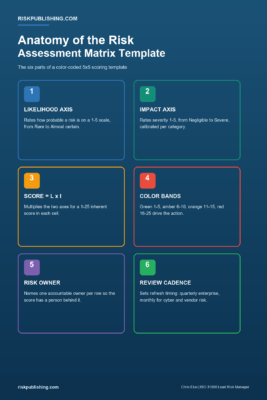 Figure 4. The six parts of a color-coded risk assessment matrix template, from the likelihood axis to the review cadence.
Get Your Risk Assessment Matrix Template Right
Risk Publishing helps US teams build, calibrate, and validate the risk assessment matrix template that anchors the enterprise risk register, then connect it to live data without losing the math.
Review the advisory services page to see how the engagement runs, and
contact the practice when the matrix is the next item on the road
Get the ERM Risk Register Template (Excel)
Put this guide into practice without building from scratch: a ready-to-use Excel risk register with a live dashboard, 5×5 inherent and residual heatmaps, automatic risk appetite testing, and a KRI tracker. Aligned to ISO 31000:2018 and COSO ERM, with 12 worked sample risks included.
Buy the Risk Register Template – $29
Chris Ekai is a Risk Management expert with over 10 years of experience in the field. He has a Master’s(MSc) degree in Risk Management from University of Portsmouth and is a CPA and Finance professional. He currently works as a Content Manager at Risk Publishing, writing about Enterprise Risk Management, Business Continuity Management and Project Management.