
A US healthcare provider greenlit a $400,000 website rebuild last year. Eleven months later, they had paid $1.2 million, slipped the launch twice, lost a senior PM, and shipped a homepage their compliance team had not signed off on. Nothing about the technology was exotic. The team simply did not project manage a website build the way a high-stakes capital project deserves. They treated it like a marketing exercise.
That is the pattern across the industry. The Standish Group’s CHAOS Report puts the long-run software project success rate at 31% successful, 50% challenged, and 19% failed outright. Website builds sit inside that distribution.
They run late, run over, and ship broken because the people running them are improvising. This guide gives you the playbook to project manage a website build the way risk professionals would: scope it, register the risks, pick the right methodology, instrument it with KRIs, and govern it to launch.
| In This Guide
→ Why 7 in 10 website builds miss their original scope, schedule, or budget — and what the data says about why → How to scope a website build project so the risk register writes itself → Picking between Agile, Waterfall, and Hybrid for your specific website project profile → The 8 risks every website build project must register, score, and mitigate before kick-off → KRIs and dashboard cuts that surface trouble while you can still steer → Where website build projects stall in 2026 — and the recovery moves that work |
1. Why Most Teams Fail to Project Manage a Website Build
Start with the numbers, because they reframe the conversation. Recent project failure research tracks IT projects across the 2020–2024 cycle and finds the success rate has barely moved despite better tooling, AI assistants, and two decades of Agile evangelism. The complexity ceiling is structural. Bigger toolchains, more stakeholders, tighter regulation, and faster release cadence all push in the same direction: harder to ship, harder to govern.
The headline number for our profession: 78% of software projects experience scope creep, and 37% of organisations cite inaccurate requirements as the top reason their projects fail. Both numbers point at the same root cause: teams begin building before they have agreed what they are building. A website build project that skips proper scoping is not a project. It is a vibe with a Jira board.
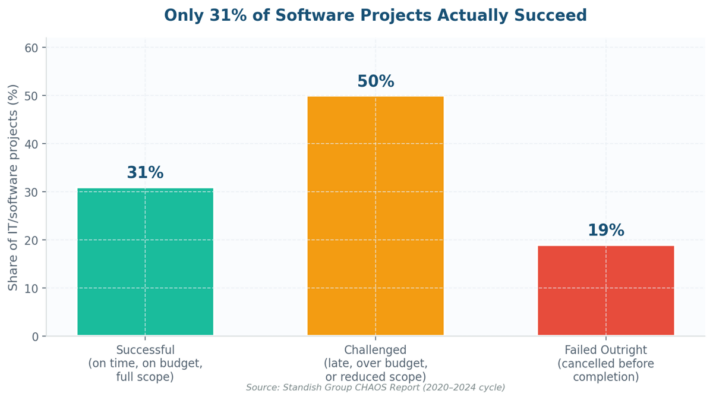
Figure 1. The CHAOS distribution that every website build project lead should keep on their desk.
The Hidden Cost of a Mismanaged Website Build Project
Direct overruns are the visible cost. The hidden costs are larger. A McKinsey analysis of large IT projects found that on average they run 45% over budget, 7% over time, and deliver 56% less value than predicted. For a website build, the value gap shows up as missed SEO traffic, broken conversion funnels, brand risk, and accessibility complaints that trigger ADA Title III litigation exposure. Treat the website build project as the multi-million-dollar bet it usually is.
Why Website Build Projects Have a Distinct Failure Profile
Three properties make website build project management harder than a typical internal IT project. First, the deliverable is public — every defect is visible to customers and Google. Second, the stakeholder count is unusually wide: marketing owns the brand, IT owns the stack, legal owns privacy and accessibility, sales owns the funnel, and finance owns the budget.
Third, the dependency map is dense — DNS, CDN, payment gateways, analytics, marketing automation, CRM, and identity providers all sit upstream of go-live. Any one of them can sink the schedule. We have a project risk management problem, not a development problem.
2. Scoping the Website Build Project Before You Touch a Line of Code
Scope is the single highest-leverage decision in website project management. Get it right and the risk register, the methodology choice, and the resourcing model fall out of it cleanly. Get it wrong and every later decision is a downstream fight. Use the four-document scoping pack below as your minimum viable scope artefact for any website build project.
The Four-Document Scoping Pack for a Website Build Project
- Project Charter. One page. Sponsor, business case, success metrics, hard constraints (regulatory, budget, launch date), explicit exclusions. If you cannot fit it on one page, the project is not scoped — it is a wishlist.
- Functional and Non-Functional Requirements Register. Numbered, testable, with each requirement traceable to a user story and an acceptance test. Non-functional requirements (performance, security, accessibility) get equal billing — they are where website builds most often fail post-launch.
- RACI Matrix. Map every deliverable to Responsible, Accountable, Consulted, Informed. Most website builds have unclear accountability between marketing and IT — name names.
- Risk Register v0.1. Drafted before kick-off, not after. We cover this in Section 3.
Acceptance Criteria the Website Build Project Cannot Launch Without
Hard launch criteria, agreed in writing before the build starts, end most launch-day arguments. The non-negotiables for any website build project worth shipping are below.
| Domain | Acceptance criterion | Standard / source |
| Performance | Largest Contentful Paint ≤ 2.5s on 75th percentile mobile | Google Core Web Vitals |
| Accessibility | WCAG 2.2 Level AA, zero critical axe-core issues | W3C WAI |
| Security | OWASP Top 10 controls verified by pen test | OWASP ASVS |
| Privacy | Cookie consent, DSAR workflow, data map signed off | GDPR / CCPA |
| SEO | Zero broken redirects from old URL inventory, indexable on launch | Schema.org + GSC |
| Resilience | Verified backup + tested restore, RTO ≤ 4 hours | ISO 22301 |
3. The Risk Register Every Website Build Project Needs
If you only build one artefact for your website build project beyond the charter, build the risk register. A good project risk register forces the team to name the threats out loud, score them on a 5×5 likelihood-impact matrix, and assign owners and mitigations. The discipline pulls forward conversations that otherwise happen at 11pm two days before launch.
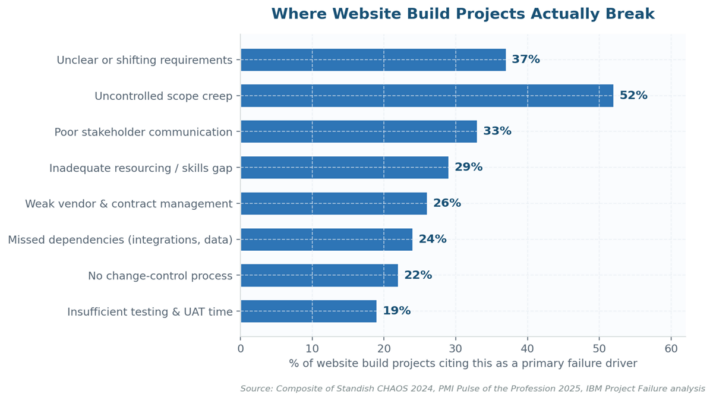
Figure 2. The failure modes that recur across every post-mortem worth reading.
The 8 Risks Every Website Build Project Must Register
The list below is the working register I open every website build project with. Adapt scores to your context. The point is to disagree about scores before you start, not after the launch slips.
| # | Risk | Likelihood (1–5) | Impact (1–5) | Primary mitigation |
| 1 | Scope creep from stakeholders | 5 | 4 | Single scope owner + written change-control with cost/time impact |
| 2 | Vendor / agency delivery slip | 4 | 5 | Milestone-based payment schedule + weekly burn-rate review |
| 3 | Cybersecurity exposure (injection, auth, supply chain) | 4 | 5 | OWASP ASVS controls + pre-launch pen test + WAF |
| 4 | Data migration loss or corruption | 3 | 5 | Dry-run migration in staging + checksums + rollback plan |
| 5 | Regulatory / accessibility breach | 3 | 5 | Privacy + accessibility review at design, code, and pre-launch gates |
| 6 | Performance miss on Core Web Vitals | 4 | 4 | Performance budget per page + Lighthouse in CI |
| 7 | Budget overrun (>20%) | 4 | 4 | Earned value tracking + weekly variance report to sponsor |
| 8 | Stakeholder misalignment at launch gate | 3 | 4 | Bi-weekly steering committee + signed go/no-go criteria |
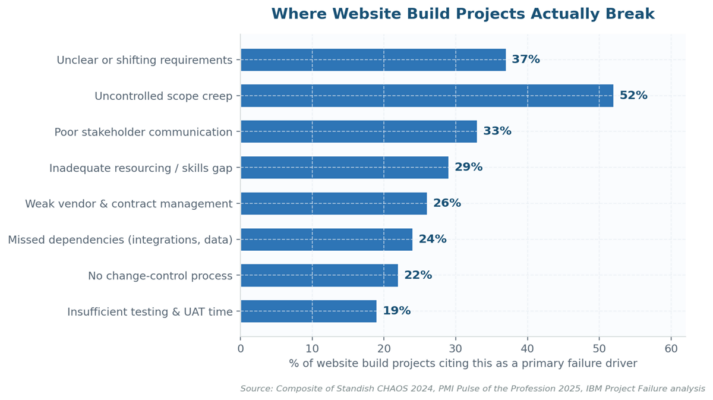
Figure 3. Score every risk twice. The gap between inherent and residual is what your controls are buying you.
How to Quantify Risks on a Website Build Project
Heat maps are necessary but not sufficient. For risks above the high threshold (score ≥15), run a quick scenario or Monte Carlo analysis on the financial exposure. A scope-creep scenario for a 6-month build might model: base case (10% overrun, $40K), realistic case (25%, $100K), worst case (60%, $240K). That single slide changes how sponsors react to mid-build change requests. We are translating qualitative risk language into numbers the steering committee actually reacts to.
4. Choosing the Right Methodology to Project Manage a Website Build
Methodology religion has done real damage. Agile is not always right. Waterfall is not always wrong. The honest question is: which methodology fits the specific website build project in front of you, given its risk profile, stakeholder topology, and regulatory exposure? Match the method to the project, not the project to the method.
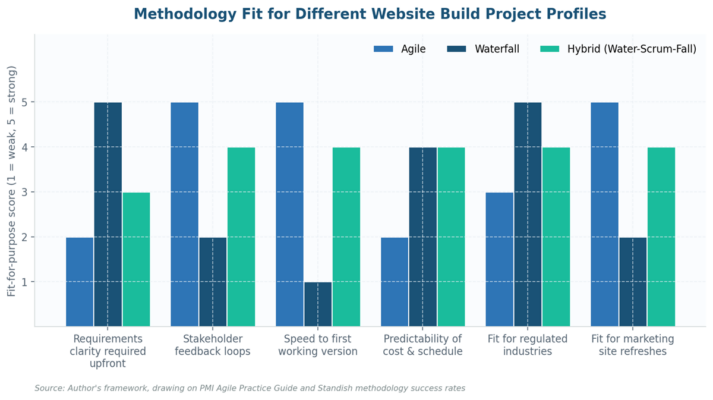
Figure 4. Methodology fit varies sharply by website build project profile.
Agile for the Website Build Project: Where It Wins
Agile shines on website build projects with evolving requirements, fast feedback loops, and tolerant launch dates. Marketing site refreshes, content-led builds, e-commerce A/B-heavy environments — these reward iteration. The PMI Agile Practice Guide lays out the underlying mechanics. Cap sprint length at two weeks, keep velocity tracking honest, and pair every demo with a retrospective. The risk Agile introduces, that nobody talks about: predictability. Sponsors paying $500K want a launch date, not a velocity chart.
Waterfall for the Website Build Project: Where It Still Wins
Waterfall earns its place on regulated builds (financial services, healthcare, government), fixed-price agency contracts, and any website build project with a non-negotiable external launch date. The Achilles heel is requirements drift. Pair waterfall with a hard change-control board and a documented scope creep prevention protocol or you will rebuild the project twice.
Hybrid Approaches to Project Manage a Website Build
In practice, most professional website build projects ship on a hybrid (sometimes called Water-Scrum-Fall). Discovery and architecture run waterfall to lock the contract, scope, and budget. Build runs in two-week Agile sprints with continuous demo. Launch and post-launch hyper-care run waterfall again with a fixed change freeze. Hybrid is harder to govern than either pure approach, which is precisely why it benefits most from a strong project risk management spine.
5. Resourcing the Team Running the Website Build Project
Resource plans fail in two predictable ways. Either the team is too thin and key roles double-hat (designer-developers, PM-product-owners), or the team is sized for build but starves at testing, content, and launch. Plan headcount across the full lifecycle, not just construction.
Core Roles a Website Build Project Cannot Ship Without
- Project Manager. Single point of accountability for schedule, budget, and risk. Not a coordinator — a decision-maker with sponsor air cover.
- Product Owner. Owns scope and priority. Has final say on what is in and what is out. Often missing on agency-led builds, which is why those builds slip.
- Technical Lead / Architect. Owns the stack, security posture, and integration boundary. Signs off non-functional requirements.
- UX / Design Lead. Owns user research, information architecture, and accessibility. Engages early, not after development starts.
- QA Lead. Owns the test strategy: functional, accessibility, performance, security regression. Not a junior tester — a strategy owner.
- Content Lead. The role that website builds most often skip and most often pay for. Owns migration, SEO, and editorial governance.
Vendor Management on the Website Build Project
Eight out of ten website builds I see involve at least one external agency, contractor, or platform partner. Treat the agency relationship as third-party risk, not as a procurement transaction. Five controls earn their keep:
- Milestone-based payments. Never pay more than 30% up front. Tie remaining tranches to demonstrable deliverables, not calendar dates.
- Right-to-audit clause. Inspect their code, security posture, and SOC 2 / ISO 27001 evidence before signing. Repeat at renewal.
- Source-code escrow. Especially for custom CMS work. If the agency disappears, you keep the build.
- Key-person clause. Name the lead developer and PM in the contract. Approval required to swap them.
- Performance SLAs with credits. Real money attached, not aspirational targets.
6. Sequencing Phases and Milestones in the Website Build Project
A website build project that lacks a sequenced phase plan with named milestones is uncontrollable. The phasing below covers the 6–9 month range typical of a mid-sized commercial website build. Compress or expand each phase proportionally to your scale.
| Phase | Typical duration | Exit gate | Common failure mode |
| Discovery | 2–4 weeks | Signed charter, requirements register, risk register v1.0 | Skipped to save time, paid for at launch |
| Design / IA | 4–8 weeks | Approved wireframes + design system + content model | Approval bottleneck with senior stakeholders |
| Build | 8–16 weeks | Feature-complete in staging, CI green, security scan clean | Scope creep absorbed silently into the sprint |
| Content + Migration | Parallel to build | Migration dry-run passes with zero data loss | Started too late; content not ready at launch |
| Testing + UAT | 3–5 weeks | Sign-off across functional, accessibility, security, performance | Compressed to absorb build slippage |
| Launch / Hyper-care | 1 week + 2 weeks | Successful cutover, sub-1% error rate, no Sev-1 in 14 days | No rollback plan; team disbanded too early |
| Post-launch review | 2 weeks after hyper-care | Lessons-learned doc, KPI baseline, optimisation backlog | Skipped — and the next build repeats the mistakes |
Each gate carries a documented go / hold / no-go decision. The phrase matters. “Go” means proceed. “Hold” means resolve specific blockers within a named window. “No-go” means we are not advancing this gate today and the steering committee owns the next move. Sponsors who have learned to use these three words save organisations millions.
7. KRIs and Dashboards That Keep a Website Build Project Honest
Lag indicators (budget burn, milestone slip) tell you about damage already done. Leading indicators (KRIs) tell you about damage forming. A website build project without KRIs is flying on instruments that report yesterday’s weather. The eight indicators below are the smallest set worth running.
| # | KRI | Green | Amber | Red |
| 1 | Schedule variance (SV%) | ≥ -3% | -3% to -10% | < -10% |
| 2 | Cost variance (CV%) | ≥ -3% | -3% to -10% | < -10% |
| 3 | Open change requests aged >14 days | ≤ 2 | 3–5 | > 5 |
| 4 | Sprint velocity volatility (rolling 3-sprint) | ≤ 15% | 15–25% | > 25% |
| 5 | Critical / high defects in last regression | 0 | 1–3 | > 3 |
| 6 | Stakeholder approval lag (days) | ≤ 3 | 3–7 | > 7 |
| 7 | Vendor invoice burn vs. % delivered | Δ ≤ 5% | Δ 5–15% | Δ > 15% |
| 8 | Risks scoring ≥15 with no active mitigation | 0 | 1 | ≥ 2 |
The One-Page Dashboard for the Website Build Project Steering Committee
Steering committees do not read 40-slide decks. They read one page. The cuts that earn their place on it: traffic-light KRI dashboard, top-five active risks, last sprint’s burn-down, milestone trend (planned vs actual), and a single decision request. Anything else is appendix. The “What, So What, Now What” framing gives sponsors a structure to react to without project management training.
8. Tools and Workflows That Make Website Project Management Stick
Tools are not the project. Workflows are. A team with Jira, Figma, and Notion still ships broken if the workflows wrapping those tools are weak. Five workflows separate the website build projects that ship from the ones that grind:
- Single source of truth for scope. One backlog, one product owner, one prioritisation cadence. Documented in the project management platform (Jira, Asana, Monday — pick one and commit).
- Daily 15-minute stand-up. Three questions. Time-boxed. Anything longer happens in a follow-up. Disciplined stand-ups are the cheapest project insurance available.
- Weekly risk review. 30 minutes, PM-led, risk register on screen. Any risk crossing the high threshold gets a same-week mitigation owner.
- Bi-weekly demo to stakeholders. Working software (or a navigable prototype). Not slides. Demos surface scope misalignment while it is still cheap to fix.
- Phase-gate review with sponsor. Go / hold / no-go decision documented in writing. The audit trail matters when the project becomes contentious.
The Project Management Tool Stack That Actually Earns Its Cost
My current default stack for a website build project: Jira or Asana for backlog and sprint management, Confluence or Notion for documentation, Figma for design, GitHub Actions for CI/CD with Lighthouse and axe-core in the pipeline, Sentry for production error tracking, and a single shared risk register in Excel or a GRC platform. The platform brand matters less than the workflow discipline running on it.
9. Where Website Build Projects Stall — And the Fixes That Work
After enough website build project post-mortems, the failure modes start to rhyme. Seven recur often enough to memorise.
- The “final” design that is never final. Stakeholders treat design approval as a phase, not a gate. Fix: hard sign-off with a named approver, written acceptance, and a documented change-control fee for post-approval revisions.
- Content is somebody else’s problem. The build is feature-complete; the content team has not started. Fix: content workstream runs parallel to build with its own PM and weekly burn report.
- UAT happens in the last week. Defects discovered too late to fix. Fix: continuous UAT — a rolling stakeholder review cohort that tests every sprint, not just the final one.
- Accessibility audit at the end. Retrofitting WCAG compliance costs 4–6x what designing for it does. Fix: accessibility checklist on every design review, automated axe-core in CI, manual audit before UAT not after.
- No rollback plan. Cutover fails, nobody knows what good looks like. Fix: documented rollback procedure tested in staging, with a 60-minute rollback SLA owned by ops.
- Team disbands at launch. Sev-1 issues hit a team that has scattered. Fix: minimum 14-day hyper-care window with the original team contractually retained.
- No lessons-learned. Same mistakes repeat on the next build. Fix: 90-minute post-launch review, 5 to 8 actions assigned, tracked through to closure.
10. What’s Next for Website Build Project Management: 2026 and Beyond
Three shifts are already changing how we project manage a website build, and the practitioners who adapt first will outperform the ones running 2018 playbooks.
AI Is Reshaping the Website Build Project Workflow
Generative AI is now a credible co-pilot for content drafting, design exploration, code scaffolding, and test generation. Gartner forecasts that by 2027, AI will reduce software development effort by 30% on greenfield projects. For a website build project that means tighter teams, faster discovery, and new risk vectors: hallucinated content, IP exposure on training data, and accessibility regressions in AI-generated code. Register AI as a controlled tool with usage guidelines, not as a productivity hack.
Composable and Headless Architectures Shift the Risk Profile
The monolithic CMS is yielding to headless and composable stacks (Sanity, Contentful, Strapi, Vercel). The trade-off: more flexibility, more integration points, more supply chain risk. Every vendor in the composable stack is now a third party your website build project depends on. Treat the stack inventory as a vendor risk register, not a tech-spec document.
Regulation Is the New Project Risk for Website Build Project Leads
Privacy, accessibility, and AI disclosure regulations are accelerating across jurisdictions. The European Accessibility Act took effect June 2025, state privacy laws stack on top of GDPR and CCPA, and AI transparency obligations are coming. Bake regulatory readiness into the scoping pack, not the launch-day panic checklist.
11. Frequently Asked Questions About Website Build Project Management
How long should a typical website build project take?
Range, not a point estimate. A marketing site refresh on an existing CMS: 8–14 weeks. A mid-sized commercial site with custom features and migration: 5–9 months. An enterprise re-platforming with multiple integrations and regulated content: 9–18 months. Anyone quoting a fixed timeline without seeing the requirements register is selling, not estimating.
Who should own the budget on a website build project — marketing or IT?
Whoever owns the business case owns the budget. Most modern website builds have a marketing-led business case (revenue, brand, conversion), which makes marketing accountable. IT remains responsible for technical delivery. The friction shows up when accountability and responsibility are not separated cleanly — fix it in the RACI before kick-off, not after the first budget meeting.
Should we use an external agency or build the website project in-house?
Trade-off, not a verdict. Agency builds win on speed-to-launch and design quality. In-house builds win on long-term TCO and product knowledge. A common pattern: external agency for the discovery, design, and initial build, then in-house ownership of ongoing optimisation and content. If you go agency, invest heavily in vendor risk management — see Section 5.
How much budget should we reserve for risk and contingency in a website build project?
Standard project management practice puts contingency at 10–20% of base budget, scaled by project complexity and risk-register exposure. For a website build project carrying multiple high-impact risks (regulated content, complex migration, multiple agencies), 20–25% is defensible. Reserve is owned by the sponsor and released only against documented risk realisation, not bundled into the run-rate.
What’s the single biggest predictor of website build project success?
Sponsor engagement, by a wide margin. The PMI Pulse of the Profession research consistently identifies active sponsorship as the top correlate of project success — outranking methodology, team size, and budget. A senior, engaged sponsor who attends gate reviews, unblocks decisions within 48 hours, and absorbs political flak is worth more than a Gantt chart on a wall.
How do we handle a website build project where the requirements keep changing?
First, distinguish discovery (requirements legitimately emerging) from scope creep (requirements being added without trade-offs acknowledged). Discovery belongs in an Agile or hybrid methodology. Scope creep belongs in a documented change request with cost, time, and risk impact. The discipline is not refusing change — it is making the cost of change visible to the sponsor every time.
12. The Bottom Line — Three Moves Every Website Project Lead Should Make
This guide is long because the topic is. Most teams reading it will not change everything at once, and that is fine. Three moves earn outsized returns on any website build project. Make these three the price of admission.
| What | So What | Now What |
| Build the risk register before kick-off, not after the first slip. | 78% of website builds suffer scope creep; the register pulls those conversations forward. | Use the 8-risk template in Section 3. Schedule a weekly 30-minute risk review on the PM calendar. |
| Pick the methodology to fit the project, not the team’s habit. | Agile and Waterfall both work — for different project profiles. Mismatch is what fails. | Score your project on the six attributes in Figure 4. Document the decision in the charter. |
| Instrument the project with KRIs from sprint one. | Lag metrics report damage. KRIs surface damage forming, while you can still steer. | Adopt the 8-KRI dashboard in Section 7. Run it weekly. Bring it to every steering committee. |
| Keep Reading on RiskPublishing
→ Project Risk Management: A Complete Guide for 2026 → riskpublishing.com/project-risk-management → How to Build a Risk Register That Boards Actually Read → riskpublishing.com/risk-register → Scope Creep: The Hidden Tax on Every IT Project → riskpublishing.com/scope-creep → Key Risk Indicators (KRIs): Design, Calibration, and Use → riskpublishing.com/key-risk-indicators → Third-Party Risk Management for Digital Vendors → riskpublishing.com/third-party-risk-management |

Chris Ekai is a Risk Management expert with over 10 years of experience in the field. He has a Master’s(MSc) degree in Risk Management from University of Portsmouth and is a CPA and Finance professional. He currently works as a Content Manager at Risk Publishing, writing about Enterprise Risk Management, Business Continuity Management and Project Management.