Tony Cox published “What’s Wrong with Risk Matrices?” in the journal Risk Analysis in 2008, showing that a poorly built matrix can rank risks no better than chance. Seventeen years on, the colored grid is still the most widely used risk picture in corporate America.
A risk heat map template earns trust only when the scales and colors are pinned down before the first scoring workshop. The build below takes about 15 minutes in Excel: a 5×5 grid, one multiplication formula, and four conditional formatting rules tied to bands a board can defend.
Cox’s objections are design flaws rather than death sentences, and each one has an engineering fix. The sections that follow build the template step by step and flag the traps the research warns about.
| Risk Heat Map Template: Key Takeaways |
| A defensible risk heat map template is a 5×5 grid where =$A2*B$1 scores every cell and four conditional formatting rules color the bands: green 1-4, yellow 5-9, amber 10-15, red 16-25. |
| Anchor the scales before the grid: five likelihood levels pinned to probability ranges (rare under 5% to almost certain above 75%) and five impact levels pinned to dollar thresholds. |
| Wire the map to the register with COUNTIFS so the colors update the moment a risk is re-scored. A pasted screenshot is stale before the meeting starts. |
| Tony Cox’s 2008 paper showed badly designed matrices mis-rank risks. Defined scales, appetite-linked bands, and quantified top exposures are the engineering answer. |
| Only 32% of US organizations rate their risk oversight as mature (NC State/AICPA, 2025), and the heat map remains the main translation layer between the register and the board. |
| Keep inherent and residual views of the same template; the movement between them is the control story your treatment budget has to defend. |
Why a Risk Heat Map Template Needs Defenses Built In
Start with the strongest case against the tool, because someone on your audit committee has read it. Cox showed that carelessly designed matrices can assign identical ratings to risks that differ by orders of magnitude, and Thomas, Bratvold, and Bickel later went further, calling matrix guidance arbitrary outright. The counterweight is practice. IEC 31010 still lists the matrix among the most widely used risk assessment techniques, and even the FAIR Institute’s critique concedes its grip on the profession while arguing for quantification. The fix is rigor inside the template, borrowing the way a qualitative and quantitative risk assessment pairs judgment with numbers.
What the Numbers Say About Risk Heat Map Template Use
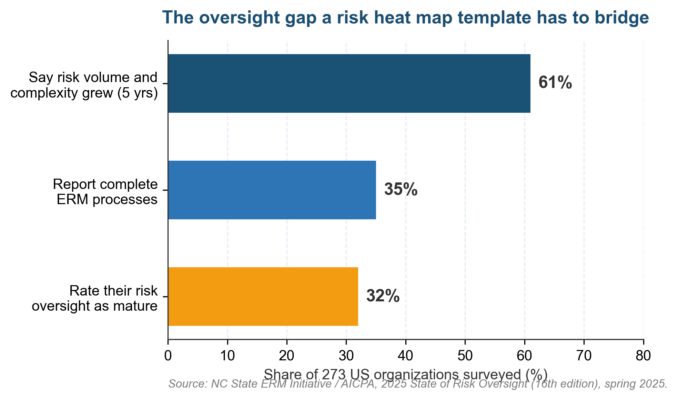 Figure 1. The gap between growing risk and modest oversight maturity that the risk heat map template is usually asked to bridge. NC State and the AICPA surveyed 273 US organizations in spring 2025: 61% said risk volume and complexity grew over five years, yet only 32% rate their risk oversight as mature and 35% report complete ERM processes. Most of that gap is managed on a colored grid, so the grid deserves engineering. Used honestly, the map is a communication device riding on an enterprise risk management framework that does the heavier analysis. Our primer on whether you should use a risk matrix covers when that trade makes sense.
Set the Scales Before You Build the Risk Heat Map Template
Scales are where most templates quietly fail. Write the descriptor tables first and anchor every level to a number, and the heat map inherits their precision; skip them and even a beautiful grid scores feelings. Our guide to likelihood definitions in risk assessment shows the calibration logic.
| Level | Likelihood label | Anchor (next 12 months) |
| 1 | Rare | Below 5% chance; no occurrence in the last decade |
| 2 | Unlikely | 5-25% chance; has happened once in five years |
| 3 | Possible | 25-50% chance; has happened in the last two years |
| 4 | Likely | 50-75% chance; happens most years |
| 5 | Almost certain | Above 75% chance; expected this year, possibly more than once |
Impact needs the same treatment, in dollars and consequences a CFO recognizes. NIST SP 800-30 pairs likelihood and impact the same way for information-security risk, which lets one set of definitions serve the whole register. A consistent risk assessment methodology keeps business units comparable.
| Level | Impact label | Example anchors |
| 1 | Insignificant | Below $50K; no injury; no regulatory contact |
| 2 | Minor | $50K-$250K; first-aid case; informal regulator query |
| 3 | Moderate | $250K-$1M; lost-time injury; reportable data breach |
| 4 | Major | $1M-$10M; hospitalization; regulator investigation |
| 5 | Severe | Above $10M; fatality; license or charter at risk |
Lock both tables on their own tab and protect the sheet. The first thing a scoring workshop tries is renegotiating the scale mid-meeting, and a protected tab ends that argument before it starts.
Build the 5×5 Risk Heat Map Template Grid in Excel
The grid itself takes ten minutes. Type impact levels 1 to 5 across B1:F1, likelihood levels 1 to 5 down A2:A6, then enter =$A2*B$1 in cell B2 and drag it across the block so every cell multiplies its row by its column. That one formula is the whole engine, the arithmetic a risk assessment matrix has always hidden behind its colors. The same block sits inside our downloadable risk assessment matrix template and the wider risk assessment templates library. Purists will note that multiplication treats a 5×1 risk the same as a 1×5 risk, and Cox would agree. If high-impact, low-likelihood events worry your board most, weight the impact side by scoring =$A2*(B$1^1.5) instead, and record the choice in the methodology note.
| Band | Scores | Cells of 25 | Required response |
| Low | 1-4 | 8 | Accept and monitor; revisit at the annual review |
| Moderate | 5-9 | 7 | Named owner; check at quarterly review |
| High | 10-15 | 6 | Treatment plan with dates; monthly reporting |
| Critical | 16-25 | 4 | Executive owner; immediate action; board visibility |
Chart: The Finished 5×5 Risk Heat Map Template Layout
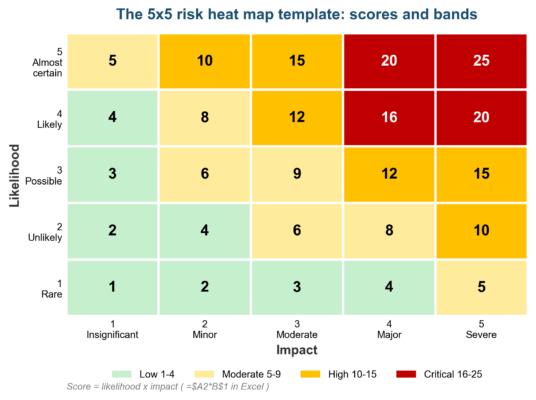 Figure 2. The finished 5×5 risk heat map template: 25 scored cells, four bands, and a formula doing all the work. Twenty-five cells, four colors, and no ambiguity about where a score lands. Keep the layout identical across business units so a regional review and the board pack read the same way at a glance.
Conditional Formatting Rules That Power the Risk Heat Map Template
Four rules do all the visual work. Select B2:F6, then choose Home, Conditional Formatting, New Rule, “Format only cells that contain,” and set Cell Value between 16 and 25 with a red fill; repeat for the other three bands. Microsoft’s conditional formatting guide documents every dialog.
| Priority | Rule | Fill color | Text format |
| 1 | Cell Value between 16 and 25 | #C00000 (red) | White, bold |
| 2 | Cell Value between 10 and 15 | #FFC000 (amber) | Black |
| 3 | Cell Value between 5 and 9 | #FFEB9C (yellow) | Black |
| 4 | Cell Value between 1 and 4 | #C6EFCE (green) | Black |
Working from the register rows instead of the grid, switch to formula rules. “Use a formula to determine which cells to format” with =AND($D2*$E2>=16,$D2*$E2<=25) colors a whole row by its band, and Microsoft’s highlight-data reference explains the dollar-sign anchoring that trips most builders. Band breaks are appetite decisions wearing colors. If the board has stated no tolerance for anything scoring 16 or higher, the critical band and the risk appetite statement must quote the same number. The IRM’s appetite guidance insists on exactly that linkage. Check the colors for readers who cannot see them. Roughly 1 in 12 men has a color vision deficiency, per the National Eye Institute, so keep the score numbers visible in every cell and let white-on-red bold mark the critical band even in grayscale.
Chart: How the Risk Heat Map Template Splits 25 Cells into Bands
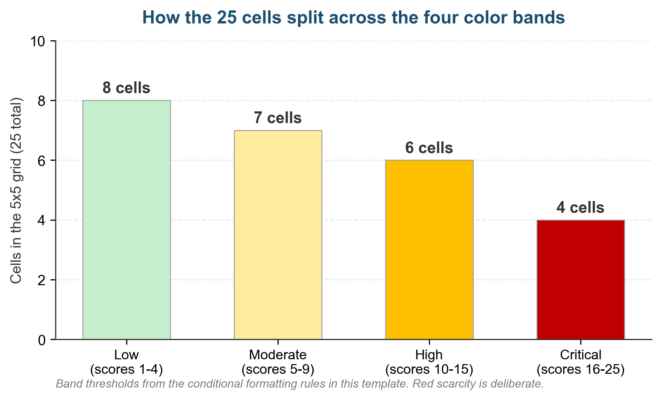 Figure 3. The deliberate scarcity inside the risk heat map template: only 4 of 25 cells earn the critical red. The split is deliberately bottom-heavy: 8 green cells, 7 yellow, 6 amber, and only 4 red. Scarcity is what makes the red corner mean something when budgets get argued.
Connect the Risk Register to the Risk Heat Map Template
A heat map pasted in as a screenshot is stale before the meeting starts. Wire the template to the register and the colors update themselves: =COUNTIFS(Register!$D:$D,$A2,Register!$E:$E,B$1) in each grid cell counts the risks sitting at that likelihood-impact pair. Convert the register to an Excel Table named Register first, so the COUNTIFS ranges grow as rows are added. Structured references spare you the broken-range bug that quietly undercounts risks after row 200, a silent failure no heat map color will flag. Add TEXTJOIN with the same conditions on a second sheet and each cell can also list its risk IDs. The structure mirrors our free risk register template in Excel, which ships with a 5×5 heatmap tab, descriptor scales, a dashboard, and ten sample risks already wired. Treat the map as the front page of the register rather than a separate artifact. The fields a risk register needs feed the map directly, and nothing on the map should exist without a register row behind it. Between re-scores, a KRI dashboard catches drift early. Re-rate on the cadence our guide to risk assessment frequency lays out, and date-stamp every re-score so movement is auditable.
Pick the Right Size and Views for Your Risk Heat Map Template
Size is a design decision, not a default. The 5×5 is the enterprise standard, the 4×4 removes the comfortable middle column, and the 3×3 suits a small team scoring in a single meeting; our 5×5 vs 4×4 risk matrix comparison takes that decision apart. For a deeper look at choosing between 5×5 and 4×4 matrix scoring, weigh granularity against rater discipline.
| Grid | Cells | Strength | Trade-off |
| 3×3 | 9 | Fast consensus for small teams | Crude bands hide risk movement |
| 4×4 | 16 | No middle column to hide in | Harder to map onto 5-level scales |
| 5×5 | 25 | Standard granularity; board familiarity | Center-cell pile-ups without calibration |
Whatever the size, keep two views of the same grid: inherent before controls and residual after. COSO ERM and ISO 31000 both expect the pair, and the inherent risk score build in Excel feeds the first view. Plot the movement as well as the positions. A gray marker for the inherent score, a colored marker for residual, and a thin arrow between them turns the heat map into a one-slide control story for the audit committee. Residual positions then justify the treatment budget. A risk that refuses to move off amber after two quarters of spending is either under-controlled or mis-scored, and our how to mitigate risk guide helps decide which.
Frequently Asked Questions About the Risk Heat Map Template
How do I build a risk heat map template in Excel with conditional formatting?
Lay impact 1 to 5 across the top row, likelihood 1 to 5 down the first column, and multiply with =$A2*B$1. Then add four conditional formatting rules for scores of 1-4, 5-9, 10-15, and 16-25. The whole build runs about 15 minutes.
What colors and score bands should a risk heat map template use?
Four bands cover the 25 cells: green 1-4, yellow 5-9, amber 10-15, and red 16-25, holding 8, 7, 6, and 4 cells respectively. Use #C00000 with white bold text for critical so it survives grayscale printing. Tie the red threshold to the board’s stated appetite.
Is a 5×5 risk heat map template better than a 3×3 or 4×4?
A 5×5 risk heat map template is the default for enterprise registers because boards recognize it and the bands stay granular. Drop to a 3×3 for one-meeting scoring with a small team. Switch to a 4×4 when raters keep hiding in the middle column.
How does the risk heat map template stay in sync with the risk register?
Replace static grid scores with =COUNTIFS against the register’s likelihood and impact columns. Each cell then counts live risks at that position, and the same four color rules handle the formatting. The map updates the moment a risk is re-scored.
How often should a risk heat map template be updated?
Re-score quarterly for most registers, and monthly for anything sitting in the critical band. The map should also refresh after any incident, acquisition, or control failure. A dated version history shows the examiner exactly when each score moved.
Do auditors and regulators accept a risk heat map template?
Yes, with a caveat. IEC 31010 lists the matrix as an accepted assessment technique, and bank examiners see heat maps in board packs constantly. The caveat from the research is to quantify the top band separately before capital decisions: show the map and the numbers.
Risk Heat Map Template Pitfalls and the Fixes
Most failed maps die the same seven deaths, and none of them are Excel’s fault. Each row below pairs the failure with the design choice that prevents it.
| Pitfall | Root cause | Remedy |
| Undefined scale labels | “Likely” means different things to different raters | Anchor every level to a probability range and dollar threshold |
| Middle-column pile-up | Raters defaulting to 3 out of 5 | Calibrate with reference risks, or use a 4×4 view to force a side |
| Colors set by feel | Band breaks never tied to appetite | Map each band to the risk appetite statement before coloring |
| Static pasted screenshots | Map rebuilt by hand each quarter | Drive cells with COUNTIFS so the map updates itself |
| One map for inherent and residual | Single plot hides the effect of controls | Keep two views and show the movement between them |
| Crowded cells with no detail | Register IDs never surfaced | List risk IDs per cell with TEXTJOIN or a dashboard drill-through |
| Treating the map as the analysis | Heat map mistaken for measurement | Quantify the critical band before capital decisions |
The last row is the research talking. A heat map ranks and communicates; it does not measure, and pretending otherwise is exactly how the tool earned its critics.
Looking Ahead: Risk Heat Map Templates in 2026 and 2027
Quantification is coming for the colors. The FAIR community keeps pressing loss-exceedance math against the matrix habit, and the practical landing spot is hybrid: colors for the full register, distributions for the top five exposures. Excel is moving too. Copilot reached general availability in Excel in late 2024 and Python in Excel followed, which puts Monte Carlo simulation one prompt away from the workbook that already holds your 5×5 grid. Supervisory expectations keep climbing as well. The OCC’s Corporate and Risk Governance handbook pushes boards toward credible, aggregated risk reporting, and GAO’s review of federal ERM practice makes the same point for agencies. The colored grid stays the translation layer. Expect the template to outlive its critics. The version that survives 2027 will be wired to live register data, paired with quantification where money moves, and honest about what colors can and cannot say.
Infographic: The Risk Heat Map Template Build in Seven Steps
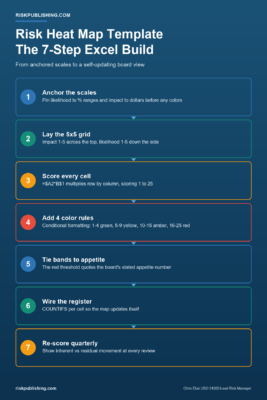 Figure 4. The seven-step risk heat map template build, from anchored scales to a self-updating board view.
Get More from Your Risk Heat Map Template
Risk Publishing helps US risk teams turn spreadsheet templates into reporting a board trusts, from registers and heat maps to KRI dashboards. If you would rather skip the spreadsheet, try our free online risk matrix generator. Read about the practice, then contact us when your heat map needs to graduate from screenshot to sys

Chris Ekai is a Risk Management expert with over 10 years of experience in the field. He has a Master’s(MSc) degree in Risk Management from University of Portsmouth and is a CPA and Finance professional. He currently works as a Content Manager at Risk Publishing, writing about Enterprise Risk Management, Business Continuity Management and Project Management.