Risk assessment software is a platform that records risks, applies a scoring method, tracks treatments and produces reporting for governance. Choose it by weighting fit with your existing method above features, testing total cost across three years, and confirming that a spreadsheet cannot already do the job well enough.
On 9 March 2026 AuditBoard, a platform used across a large share of the Fortune 500, announced it was relaunching under the name Optro, citing artificial intelligence reshaping governance, risk and compliance. The product did not change that week. The logo did.
That rebrand landed in the middle of a much broader reshuffle. Lumivero bought SharpCloud in January 2026, having already absorbed Palisade, the maker of the Excel add-in @RISK that whole generations of risk analysts first learned Monte Carlo simulation on.
| Risk Assessment Software: Key Takeaways |
| Risk assessment software stores, scores and reports risks against a method you already own. It does not supply the method, and buying before the method is settled hard-codes a scale you are about to revise. |
| The category consolidated hard. AuditBoard relaunched as Optro on 9 March 2026, Lumivero acquired SharpCloud in January 2026, and Palisade’s @RISK now sits inside Lumivero rather than standing alone. |
| Mordor Intelligence puts the GRC software market at 23.32 billion dollars in 2026, rising to a forecast 39.01 billion by 2031, so pricing pressure will not be doing buyers any favors. |
| Six tests decide whether you need a platform at all. Under roughly 150 risks, with one assessing team and no integration requirement, a maintained spreadsheet register is faster to change and cheaper to run. |
| Weight the scorecard before the first demo. Fit with your existing scoring method deserves the largest share, ahead of features, because a tool that cannot express your scale forces you to change it. |
| Three-year cost is the number that matters, not the license. Implementation, integration, administration and the internal time to migrate a register routinely exceed the subscription in year one. |
| Adoption fails on administration burden more than on capability. If updating a risk takes more clicks than editing a spreadsheet row, the register goes stale and the platform becomes an expensive archive. |
None of that movement changes what a buyer actually has to decide. The hard question is not which vendor is ascendant this quarter, it is whether risk assessment software will carry your method better than the spreadsheet you already maintain, and Accounting Today’s coverage of the rebrand is a useful reminder of how fast names move.
What Risk Assessment Software Actually Does
Underneath the shifting category names, risk assessment software products all do a fairly short list of things. Stripping the marketing back to that list is what makes comparison possible, because every vendor describes the same six core functions in a different vocabulary.
| Function | What it replaces | What to test in a demo |
| Risk register | A shared spreadsheet with version conflicts. | Add a risk, change its score, and count the clicks. Then find that change in the audit trail. |
| Scoring engine | A matrix formula somebody built and nobody documented. | Enter your own scale, including any non-standard band, and confirm it renders without workarounds. |
| Workflow | Chasing owners by email before each committee. | Route a treatment plan for approval, reject it, and see whether the rejection reason is captured. |
| Control library | A separate controls tab with manual cross-references. | Map one control to three risks and check the residual scores update consistently. |
| Evidence and audit trail | Folders of dated attachments in shared storage. | Attach a test result, then try to alter a historic score and see whether the system prevents it. |
| Reporting | A slide deck rebuilt by hand each quarter. | Produce the board view without exporting to another tool. Most failures surface here. |
Table 1. The six functions that make up almost every risk assessment software platform, and how to test each one.
Notice what is absent from that list. No risk assessment software decides your appetite, calibrates your scale or determines which risks matter, and the ISO 31000:2018 process it automates has to exist first, as our guide to building a risk assessment program sets out.
The Category Rebranded Itself Again in 2026
Naming churn in risk assessment software matters to buyers for one practical reason: it makes research stale fast. A shortlist assembled from an eighteen-month-old comparison article may reference two products that have since been absorbed and one that now answers to a completely different name.
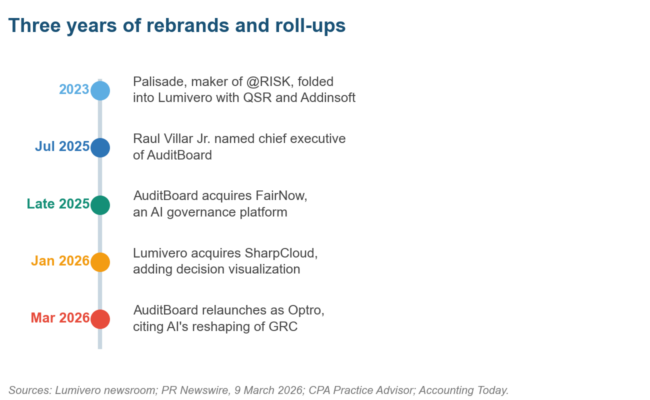
Figure 1. Three years of ownership changes behind risk assessment software that still appears on shortlists under old names.
The Palisade example is the one longest-serving analysts feel. @RISK and the DecisionTools Suite were the default Excel add-ins for Monte Carlo work, and they now sit inside Lumivero’s portfolio alongside QSR and Addinsoft, with subscription plans replacing the old perpetual model.
Spending has not slowed while the badges changed hands. Mordor Intelligence sizes the GRC software market at 23.32 billion dollars in 2026 and forecasts 39.01 billion by 2031, which works out at a rise of 67 percent across just five years.
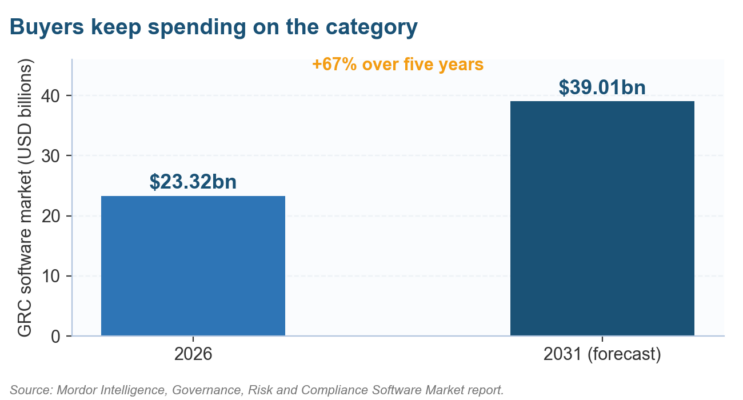
Figure 2. A growing market means more risk assessment software vendors chasing you, not better terms for you.
Read that trajectory as a warning rather than a recommendation. Rising category spend tells you competition for budget is intense, and it says nothing about whether the risk assessment software suits an organization of your size, which is the only question your finance director will ask.
Vendor-by-vendor comparison is a separate job from method selection, and we keep the two apart on purpose. Our roundups of ERM platforms, RMIS products and risk quantification tools handle the feature detail at the depth that particular decision needs.
When a Spreadsheet Still Beats a Platform
The most useful thing a buyer can do is establish whether the purchase is necessary. Plenty of programs that bought early are running licensed risk assessment software that holds fewer risks than a single workbook tab, at several thousand dollars a year.
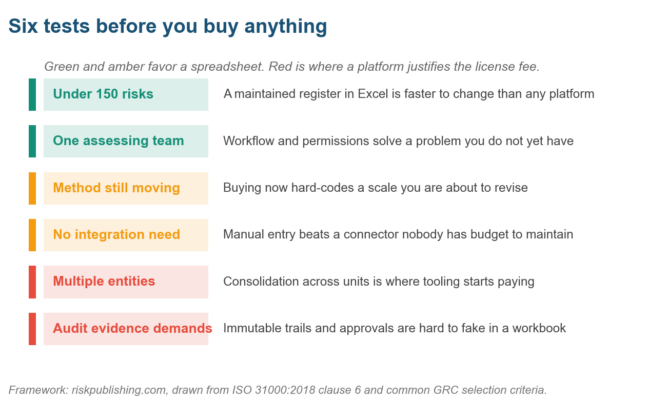
Figure 3. Six conditions that decide the risk assessment software question before any vendor conversation starts.
Volume is the crudest test and still the most reliable. Below roughly 150 live risks assessed by a single team, editing a row in a maintained register is faster than navigating any risk assessment software, and the risk register template plus a matrix template in Excel covers it.
Three conditions genuinely flip the answer toward buying, and they share a revealing feature. Each one involves something a workbook cannot enforce rather than something it simply cannot store, which is why simply adding more columns never resolves any of them:
- Multiple entities or units scoring independently, where consolidation onto one comparable scale is the actual deliverable and manual merging introduces errors every cycle.
- Audit or regulatory demands for an immutable trail, where an examiner will ask who changed a score, when, and on what evidence. Spreadsheets answer that question poorly.
- Permissions that matter, where a business unit must see and edit only its own risks while the risk function sees everything, which is access control rather than formatting.
A free tool bridges the gap for many teams while they decide. Our online risk matrix generator and the heat map template produce board-ready output without a procurement cycle, which buys the time you need to settle the method properly first.
Building the Requirements List Before the Demo
Vendors run excellent demos, and that is precisely the problem. The only reliable defense is a weighted scorecard written before you see a single screen, because requirements invented during a demonstration tend to describe the product you were just shown.
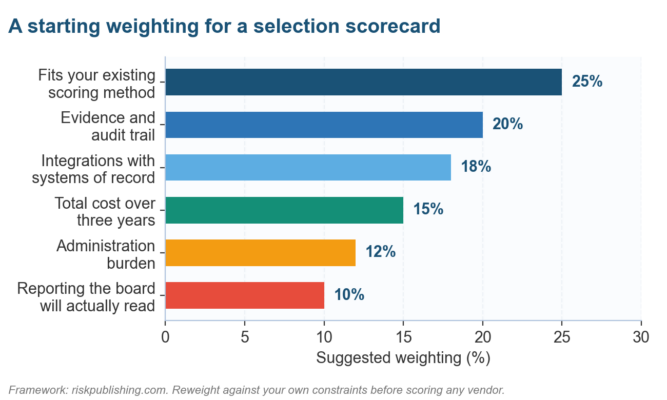
Figure 4. A starting weighting for scoring risk assessment software. Fit with your existing method carries the most because changing it is the expensive option.
Method fit deserves that top weighting for a thoroughly unglamorous reason. If risk assessment software cannot express your likelihood bands, your impact definitions or your appetite thresholds, the implementation quietly rewrites them, and every historic score you already hold becomes incomparable.
| Requirement | The question to write down | Evidence that answers it |
| Scoring flexibility | Can it hold our exact scale, including any asymmetric bands? | A configured instance showing our scale, not a standard 5×5 the vendor prefers. |
| Inherent and residual | Does it track control effectiveness between the two scores? | A worked risk showing inherent, control rating and residual, with the arithmetic visible. |
| Evidence handling | Can we attach and version test results against a control? | An attachment with a date, an uploader and a locked historic version. |
| Reporting | Will the board pack come out of this tool unedited? | An exported committee report a director could read without reformatting. |
| Access control | Can units see only their own risks while we see everything? | Two logins demonstrated live, showing different scopes on the same register. |
| Exit | How do we get our data out if we leave in year three? | A full export, in a documented format, performed during the trial rather than promised. |
Table 2. Six requirements worth writing down before any vendor conversation, with the proof that settles each.
That last row is the one buyers skip and later regret. Ask for the export during the trial and watch what arrives, because a migration quoted as straightforward at signature has a way of becoming a full project at renewal time.
Evaluating Risk Assessment Software Without Getting Sold To
With the scorecard fixed and weighted, the risk assessment software evaluation becomes a controlled test rather than a sales process. The single most effective technique available to you is refusing the vendor’s standard demo script and supplying your own data and your own risks instead.
Hand each shortlisted vendor the same five real risks from your register, with your scale attached, and ask them to configure and score those risks live. Identical inputs make outputs comparable, which is the whole point of a structured evaluation.
| Stage | What happens | The decision it produces |
| Longlist | Desk research against the weighted criteria, no vendor contact yet. | Six to eight products that plausibly hold your method, scored on published information. |
| Shortlist | Written requirements sent out, responses scored blind against the weights. | Three products, ranked, with gaps documented before anyone sees a demonstration. |
| Scripted demo | Your five risks, your scale, your reporting requirement, same script per vendor. | A like-for-like comparison of configuration effort and how each handles awkward cases. |
| Trial | Two to four weeks with real users entering real risks in a sandbox. | Evidence on administration burden, which is where adoption usually fails. |
| Reference calls | Two customers of similar size and sector, asked about year two, not year one. | The renewal picture: what broke, what cost more, what they would not buy again. |
Table 3. A five-stage evaluation that keeps comparison honest across vendors.
Reference calls are worth protecting in the timetable when it starts to compress. Ask specifically about the second year, since implementations are usually well supported and it is the renewal period that exposes true administration cost and real support quality.
Where quantification matters to you, test that capability separately and hard. Risk assessment software claiming Monte Carlo or FAIR-based analysis vary enormously in rigor, and our guides to Monte Carlo in Excel and cyber risk quantification give you the questions worth asking.
What It Really Costs Over Three Years
Subscription price is the number risk assessment software vendors compete on and often the smallest line in the whole implementation. Building a three-year model before negotiation changes the conversation, because it moves discussion from list price to the costs that actually accumulate afterward.
| Cost line | Typical share | What drives it up |
| Subscription | Roughly a third | Per-user pricing when occasional contributors need access; module bundling you do not need. |
| Implementation | Roughly a quarter | Configuration of a non-standard scale, historic data migration, integration build. |
| Internal time | Roughly a quarter | Risk team hours defining requirements, cleaning the register, testing and training units. |
| Integration upkeep | Roughly a tenth | Connectors to systems of record that break at each upgrade and need an owner. |
| Training and turnover | The remainder | Re-training after staff changes; a platform nobody can administer becomes shelfware. |
Table 4. The five cost lines to model across three years. Shares vary by organization; the shape rarely does.
Data migration is the line most often underestimated. Moving a mature register means reconciling historic scores to a new scale, and if the scale changes in the process you lose trend comparability, which is often the reason for buying at all.
Budget internal time honestly, and account for it separately. The risk function will spend weeks on requirements, cleaning and testing, and treating those hours as free is how implementations slip while the assessment cycle that justified the purchase quietly stalls.
Integrations That Decide Whether Anyone Uses It
Adoption tends to hinge on whether risk data has to be typed twice. Risk assessment software that pulls from the systems people already work in gets used, and one that demands duplicate entry drifts out of date within about two cycles.
| Integration | What it saves | The question to ask |
| Identity and single sign-on | Password friction that keeps occasional contributors out. | Does it support our identity provider natively, without a paid add-on? |
| Incident and ticketing | Manual re-entry of events that should update risk scores. | Can an incident above a threshold raise or flag a linked register entry automatically? |
| Vendor and procurement | Duplicate third-party records maintained in two places. | Does the vendor list sync, and which system is authoritative when they disagree? |
| Business intelligence | Rebuilding board charts by hand every quarter. | Can our reporting layer read the register directly rather than through exports? |
| Document storage | Attachments scattered between the platform and shared drives. | Do links to existing storage count as evidence, or must files be uploaded again? |
Table 5. Five integrations that determine whether the register stays current between cycles.
Incident feeds repay the integration effort fastest of the five. When an event above a defined threshold automatically flags the related risk for review, monitoring stops depending on somebody remembering, which is the same logic behind threshold-based key risk indicators.
Adjacent categories overlap here more than vendors admit. Depending on where your gap sits, the right purchase may be an incident management system, a compliance platform, or third-party risk tooling rather than a general-purpose risk product at all.
Risk Assessment Software: Your Questions Answered
What is risk assessment software?
Risk assessment software is a platform that holds a risk register, applies a scoring method, tracks treatment plans and produces governance reporting. It automates the administration of a risk process. It does not define the method, the scale or the appetite thresholds, which remain the organization’s own decisions.
Do small organizations need risk assessment software?
Usually not at first. Below roughly 150 live risks with one assessing team, a maintained spreadsheet register is quicker to change and costs nothing. Buying becomes justified when multiple units score independently, when permissions matter, or when an examiner needs an immutable audit trail.
How much does risk assessment software cost?
The subscription is usually about a third of three-year cost. Implementation, integration, internal staff time and training carry the rest, and per-user pricing inflates quickly once occasional contributors need access. Model all five lines before negotiating rather than comparing list prices.
What is the difference between risk assessment software and a GRC platform?
Risk assessment software focuses on identifying, scoring and treating risks. GRC platforms bundle that with compliance obligations, policy management, audit and issue tracking in one suite. Suites cost more and suit organizations consolidating several functions, as our GRC framework guide explains.
Can Excel work as risk assessment software?
For a single team with a stable method, yes, and many credible programs run that way for years. Excel fails on concurrent editing, permissions and tamper-evident history. Those three gaps, rather than any missing feature, are what eventually force a move to a platform.
What should we test during a risk assessment software demo?
Supply your own scale and five real risks, then ask each vendor to configure and score them live. Count the clicks needed to update one risk, produce the board report without exporting, and attempt to alter a historic score to confirm the trail holds.
How long does implementation take?
Plan three to six months for a mid-sized organization, covering configuration, migration of the existing register, integration and training. Simple deployments with a clean register and no integrations finish faster. Migrations that also change the scoring scale reliably take longest and risk losing trend data.
What happens to our data if we switch vendors?
That depends entirely on the export you negotiated. Request a complete export in a documented format during the trial and inspect what arrives, since attachments, historic scores and audit trails frequently export far less cleanly than the current register itself does.
Where Implementations Go Wrong
The risk assessment software failures below turn up repeatedly in programs that bought sensibly and still ended up maintaining an expensive archive. Each one of them is markedly cheaper to prevent during selection than to fix after a two-year commitment has already been signed.
| Failure | How it shows up | The prevention |
| Buying before the method settles | The scale changes six months in and historic scores stop comparing. | Fix and publish the scoring guide before procurement opens, not during configuration. |
| Feature-led selection | The product with the longest capability list wins, then nobody uses two thirds of it. | Score against the weighted criteria only, and record why each unused module was excluded. |
| Ignoring administration burden | Updating one risk takes nine clicks, so units stop updating between cycles. | Measure clicks-per-update during the trial with real users, not with the vendor driving. |
| Migrating a dirty register | Duplicate and stale risks are carried across and now look official. | Clean and close the register before migration; a smaller accurate set beats a full messy one. |
| No named administrator | Configuration decays after the champion moves roles. | Name a primary and a deputy administrator in the business case, with time formally allocated. |
| Integration promised, not built | The connector stays on the roadmap and duplicate entry becomes permanent. | Make the integration a contractual deliverable with a date, or plan on doing without it. |
| Reporting rebuilt outside the tool | The board pack is still assembled by hand, so the main benefit never lands. | Require an unedited committee report during the trial before signature. |
Table 6. Seven recurring implementation failures, each with the prevention that costs least.
The first and third failures cause the most damage together. A method that shifts after configuration forces rework nobody budgeted, and if updating a risk is already tedious the units simply stop, leaving a register that looks authoritative and is quietly a year out of date.
Control testing discipline either survives the transition or it does not. Whatever risk assessment software lands, the self-assessment cycle and the inherent to residual arithmetic have to work the same way afterward, or your scores quietly change meaning at the point of migration.
Where the Category Heads Next
Three shifts are already visible in the 2026 activity. The first is artificial intelligence moving from a marketing line to an actual selection criterion, which the Optro relaunch made explicit and Corporate Compliance Insights reported at the time of the announcement.
The second is consolidation continuing to narrow genuine choice. As suites absorb point products, buyers of risk assessment software increasingly select a vendor rather than a tool, and switching costs rise accordingly, a pattern CPA Practice Advisor traced through the AuditBoard name change.
The third is quantification becoming a standard expectation rather than a specialist module. Interest in NISTIR 8286 and in translating cyber exposure into financial terms is pushing scoring beyond coloured grids, and IEC 31010 techniques are showing up in product roadmaps.
Run the six risk assessment software tests in Figure 3 before you take a single call. If your answers sit in the green and amber bands, spend the year fixing the method instead, and revisit the market when consolidation across units genuinely becomes the constraint.
If you are a US risk lead weighing risk assessment software against the register you already run, we help write the requirements and score the shortlist without a vendor in the room. See what we do with risk teams, or send us a note with the scale you use today and the gap you are trying to close.

Chris Ekai is a Risk Management expert with over 10 years of experience in the field. He has a Master’s(MSc) degree in Risk Management from University of Portsmouth and is a CPA and Finance professional. He currently works as a Content Manager at Risk Publishing, writing about Enterprise Risk Management, Business Continuity Management and Project Management.